
Solving Inequality Constraints
Loading the math board and drawing, please wait…
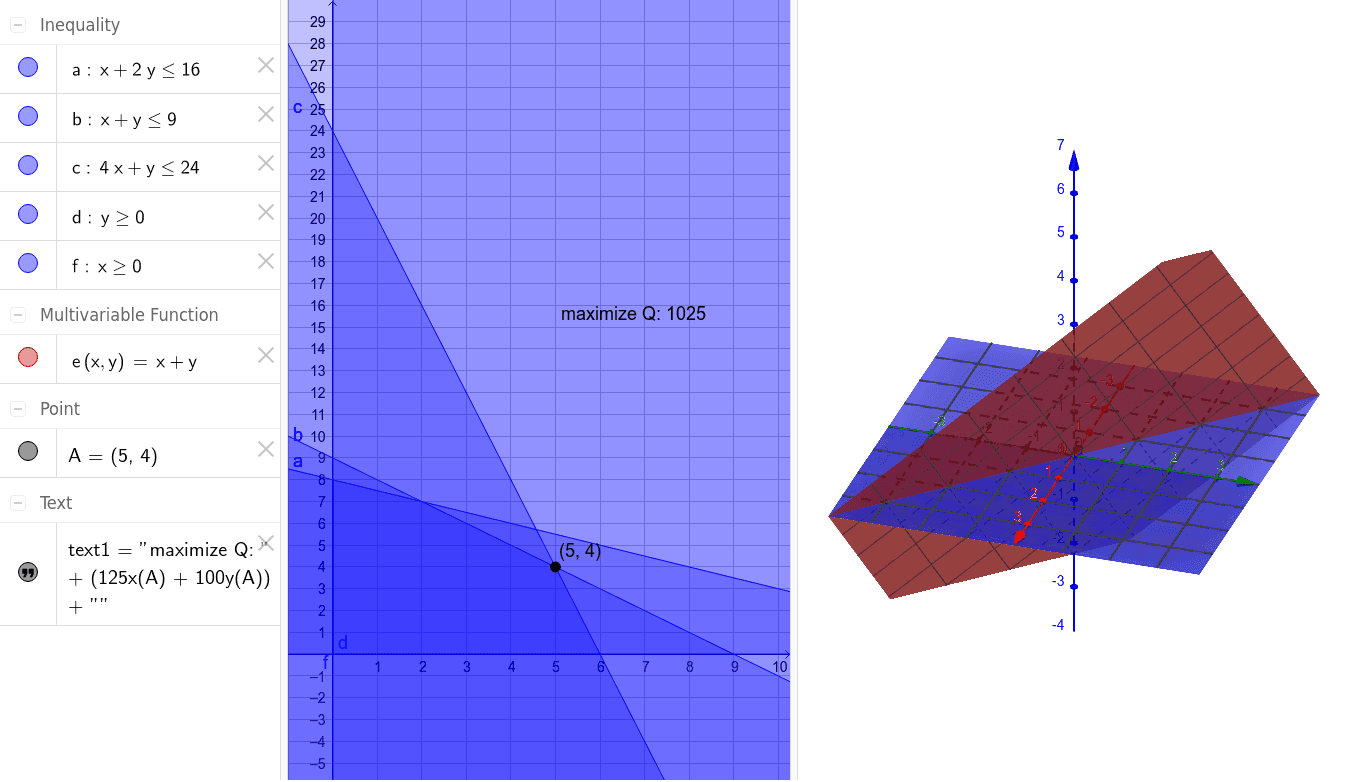
This example demonstrates how to solve multiple constraint problems using GeoGebra through visual methods. It involves core math concepts like inequalities, polygons, geometric transformations, and probability & statistics. Key GeoGebra commands/objects used include a, b, A, d, e, c, f, and text1 for polygon construction and constraint visualization. Suitable for high school and above students to understand geometric representations and optimization under inequality constraints.
GeoGebra Commands & Parameters
a(x, y) = x + (2 * y) ≤ 16b(x, y) = x + y ≤ 9Point A(5.0, 4.0)d(y) = y ≥ 0e(x, y) = x + yc(x, y) = (4 * x) + y ≤ 24f(x) = x ≥ 0
AI Drawing Prompt Reference
Draw the regions defined by the inequalities x+2y≤16, x+y≤9, and 4x+y≤24 on a coordinate plane, highlighting the non-negative constraints x≥0 and y≥0 with different colors, and mark the key point (5,4) and the intersection points of the constraint lines, showing the feasible solution set under these inequalities.
The prompt above was compiled from the original drawing commands and is for reference only.