
Circumcenter of a Triangle
Loading the math board and drawing, please wait…
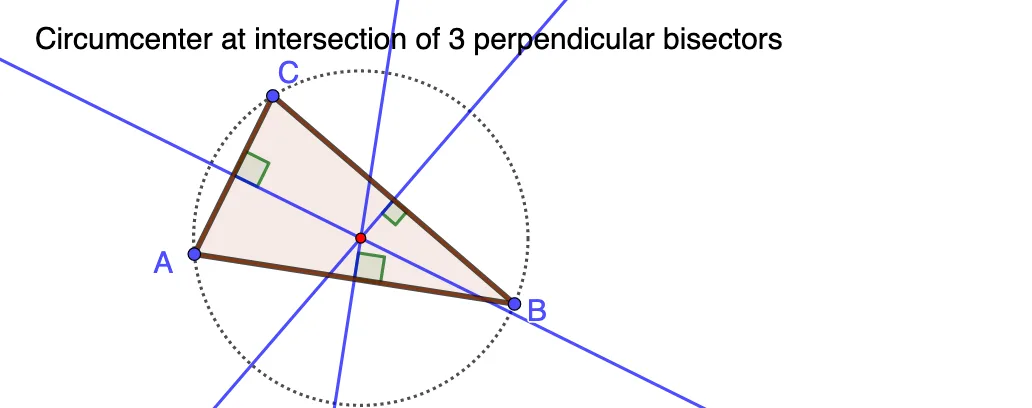
This example demonstrates how the circumcenter of a triangle can be found at the intersection of three perpendicular bisectors. Key mathematical concepts include the perpendicular bisectors and the circumcircle of a triangle. Using GeoGebra commands such as Segment, Midpoint, LineBisector, Point, Angle, and Intersect, the construction process is visually illustrated. Suitable for middle school and above students to learn about triangle properties and geometric constructions.
GeoGebra Commands & Parameters
Segment(A, B) → fMidpoint(A, B) → CLineBisector(f) → gPoint(g) → DAngle(B, C, D) → αSegment(A, E) → hSegment(E, B) → iSegment(A, C) → jSegment(C, B) → kSegment(A, F) → lSegment(F, B) → mMidpoint(m) → GMidpoint(l) → HLineBisector(l) → nLineBisector(m) → pIntersect(n, p) → IAngle(I, G, B) → βPoint(n) → JAngle(I, H, F) → γCircle(I, B) → cPolygon(A, B, F) → t1, f_1, a, b
AI Drawing Prompt Reference
Draw a triangle and find its circumcenter. Start by drawing the three sides of the triangle. Then construct the perpendicular bisectors of two sides; their intersection is the circumcenter. Using the circumcenter as the center and the distance to any vertex as the radius, draw the circumcircle of the triangle. On one perpendicular bisector, pick a point and connect it to the two endpoints of the side to form an angle, and label that angle. Similarly, on another perpendicular bisector, pick a point and construct and label a related angle. Finally, draw the three sides of the triangle clearly, and mark the midpoints of the sides.
The prompt above was compiled from the original drawing commands and is for reference only.