
Solving Addition and Multiplication Equations with Scales
Loading the math board and drawing, please wait…
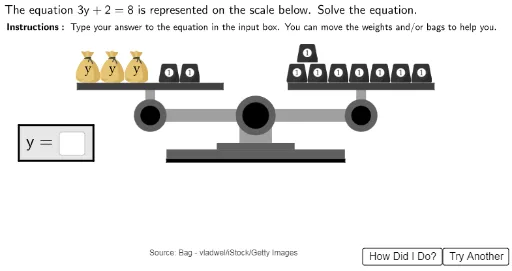
This example uses a scale model to demonstrate how to solve addition and multiplication equations. Key mathematical concepts include solving equations and ratio relationships. It utilizes commands like Polygon, Circle, Random, and Textfield to construct multiple scale models, illustrating how to solve equations by adjusting items on the scales. Suitable for middle school math education and learning.
GeoGebra Commands & Parameters
Polygon((2.75, 1.95), (2.75, 2.05), (8.25, 2.05), (8.25, 1.95)) → ScaleBottom1, f, g, h, iPolygon((4.3, 2.35), (4.3, 2.55), (6.7, 2.55), (6.7, 2.35)) → ScaleBottom3, n, p, q, rPolygon((5, 2.55), (5, 3.25), (6, 3.25), (6, 2.55)) → ScaleBottom4, s, t, d, ePolygon((2.75, 2.05), (2.75, 2.35), (8.25, 2.35), (8.25, 2.05)) → ScaleBottom2, j, k, l, mPolygon(Left + (0, 0.2), Left - (0, 0.2), Right - (0, 0.2), Right + (0, 0.2)) → ScaleArm, f_1, g_1, h_1, i_1Circle(Left, 0.5) → LeftArmCircle1Circle(Left, 0.3) → LeftArmCircle2Circle(Right, 0.5) → RightArmCircle1Circle(Right, 0.3) → RightArmCircle2Polygon(Left - (0.15, 0), Left + (0.15, 0), Left + (0.15, 0.8), Left + (-0.15, 0.8)) → LeftArmStand, j_1, k_1, l_1, m_1Polygon(Right - (0.15, 0), Right + (0.15, 0), Right + (0.15, 0.8), Right + (-0.15, 0.8)) → RightArmStand, n_1, p_1, q_1, r_1Polygon(Left + (-2.25, 0.8), Left + (-2.25, 1), Left + (2.25, 1), Left + (2.25, 0.8)) → LeftTray, s_1, t_1, a_1, b_1Polygon(Right + (-2.25, 0.8), Right + (-2.25, 1), Right + (2.25, 1), Right + (2.25, 0.8)) → RightTray, c_1, d_1, e_1, f_2Circle((5.5, 3.4), 0.6) → ScaleBottom5Circle((5.5, 3.4), 0.4) → ScaleBottom6Random(1, 2) → sideorderTextfield(usertext) → InputBox1Polygon((-1.8, 3.1), (0.5, 3.1), (0.5, 2), (-1.8, 2)) → AnswerBoxOutline, g_2, h_2, i_2, j_2
AI Drawing Prompt Reference
Draw a balance scale model for solving addition and multiplication equations. The scale has a sturdy base made of stacked rectangles, two vertical stands, a horizontal beam, and two trays on each side. Each side has circular pivot points and the trays hold round objects. Include a text input box and an answer box nearby. The composition is symmetrical, emphasizing the balance concept for math education.
The prompt above was compiled from the original drawing commands and is for reference only.