
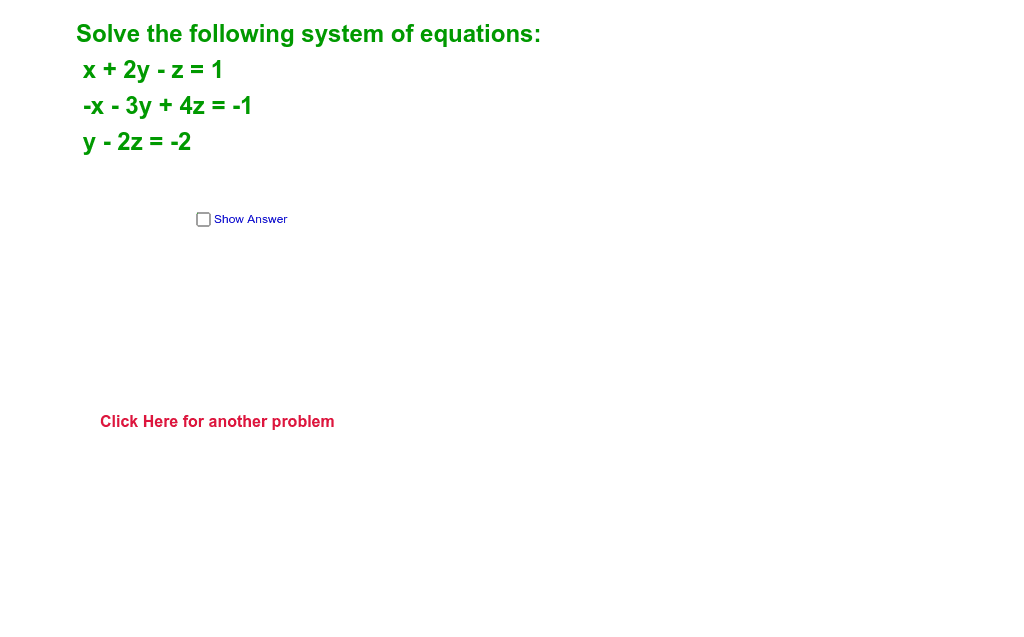
Solving a 3x3 system of equations: Rectangle and Vector Construction
Loading the math board and drawing, please wait…
In collections
Linear Algebra
This example demonstrates solving a 3x3 system of equations using GeoGebra, involving concepts like rectangle, root, real numbers, parallelogram, and vectors. Key construction steps include using Random, Element to generate random points, pick, c34 to locate critical points, and parameters like A1, c, q to control the graph. Suitable for high school students learning analytic geometry and vector applications, useful for mathematical modeling and geometric construction practice.
GeoGebra Commands & Parameters
Random(-2, 2) → c34Random(-7, 7) → c12Random(-7, 7) → c13Random(-7, 7) → c23Random(-7, 7) → c14Random(-7, 7) → c24Random(-7, 7) → cRandom(-3, 3) → qRandom(-3, 3) → sRandom(-4, 4) → rElement({"Reduced Row Echelon Form Of", "transpose of", "scalar multiple of"}, pick) → opElement({ReducedRowEchelonForm[A3], Transpose[A3], (c * A3)}, pick) → CElement(C, 1, 4) → x1Element(C, 2, 4) → y1Element(C, 3, 4) → z1
AI Drawing Prompt Reference
Draw the solution of a 3x3 linear system and construct a rectangle and vectors based on it. First, randomly generate four points c34, c12, c13, c23, then generate points c, q, s, r. Use a randomly selected operation (such as reduced row echelon form, transpose, scalar multiple) to construct key points x1, y1, z1, and finally construct a rectangle and vectors based on these points.
The prompt above was compiled from the original drawing commands and is for reference only.