
SolveMyMaths Action 2! Dynamic Geometry Optimization
Loading the math board and drawing, please wait…
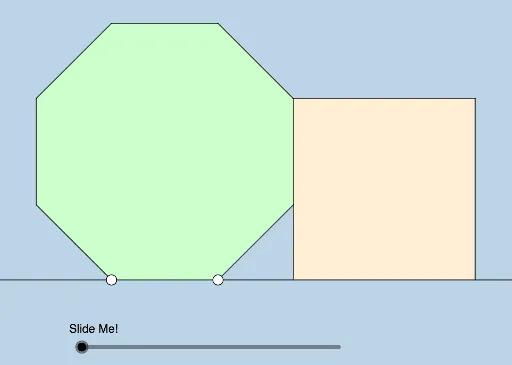
① This interactive GeoGebra example dynamically illustrates a geometry optimization problem posed by Ed Southall (UK) on Twitter, featuring a square with inscribed circles, tangents, and adjustable proportions. ② Core mathematical concepts include squares, tangent lines, roots, optimization problems, ratios, and boxplots for data distribution, blending geometric construction with extremum seeking. ③ Construction highlights: using GeoGebra commands such as Polygon, Line, Intersect, Segment, Dilate, OrthogonalLine, Distance, Circle, Rotate, Angle, Ray, CircleSector, Midpoint, Vector, and Translate, the model builds polygons, lines, circles, angles, sectors, midpoints, and vectors, all controlled by sliders for dynamic manipulation. ④ Suitable for high school and above, this resource helps students and teachers explore geometric optimization, tangent properties, and ratio relationships, and serves as an interactive tool for math modeling or competition preparation.
GeoGebra Commands & Parameters
Polygon(A, B, 8) → poly1, f, D, E, F, G, H, g, h, i, j, k, l, m, CLine(A, B) → nLine(D, C) → pIntersect(n, p) → IPolygon(D, I, 4) → poly2, q, r, s, t, J, KSegment(A, H) → aSegment(H, G) → bSegment(G, F) → cSegment(F, E) → dSegment(E, D) → eSegment(C, B) → f_1Segment(D, I) → g_1Segment(D, K) → h_1Segment(K, J) → i_1Dilate(C, If[0 < o ≤ 1, 1 - o, 0], J) → C'_1Segment(C, C'_1) → j_1OrthogonalLine(H, n) → k_1Intersect(n, k_1) → LDilate(H, If[1 < o ≤ 2, 2 - o, 0], L) → H'Segment(H, H') → l_1Line(H', n) → m_1Intersect(m_1, a) → MPolygon(H, H', M) → t1, m_2, h_2, h'Segment(H', M) → n_1Distance(L, A) → uCircle(A, (0.8 * u)) → c_1Intersect(c_1, n) → N, ORotate(H, 22.5°, A) → H'_1Angle(H, A, H'_1) → αRay(A, H'_1) → p_1Intersect(p_1, l_1) → PDilate(A, If[2 < o ≤ 3, 3 - o, 0], P) → A'Segment(A, A') → q_1Rotate(N, If[3 < o ≤ 4, ((-(o - 3)) * π / 8), ((-π)) / 8], A) → N'CircleSector(A, N', N) → d_1Midpoint(F, B) → QMidpoint(D, J) → RRotate(d_1, If[4.5 < o ≤ 5.5, ((-(o - 4.5)) * π / 8), ((-π)) / 8], A) → e_1Dilate(A, If[6 < o ≤ 7, 7 - o, 0], Q) → A'_1Vector(A, A'_1) → vTranslate(e_1, v) → r_1Dilate(Q, If[7 < o ≤ 8, 8 - o, 0], J) → Q'Vector(Q, Q') → wTranslate(r_1, w) → s_1Rotate(s_1, If[7 < o ≤ 8, (((-(o - 7)) * 15) * π / 8), π / 8], Q') → t_1
AI Drawing Prompt Reference
Draw a square and two tangent circles inside it, with the radius of one circle adjustable. First, draw a square, then choose a point on the diagonal as the center of a circle with an adjustable radius, making it tangent to two sides of the square. Next, adjust the center position to draw another circle that is tangent to the first circle and also tangent to two sides of the square. Finally, adjust the center position and radius to observe the changes in the relationship between the square and the circles.
The prompt above was compiled from the original drawing commands and is for reference only.