
Solve Quadratic Equations by Factorization
Loading the math board and drawing, please wait…
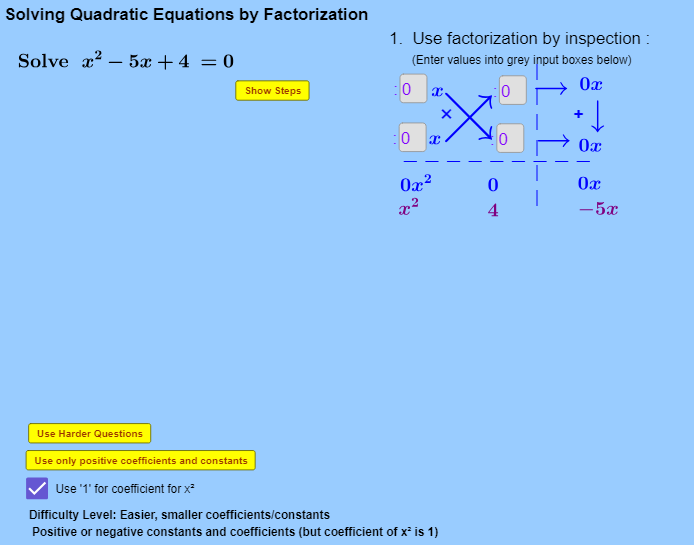
This example demonstrates how to solve quadratic equations using factorization. Key math concepts involved include quadratic equations, factorization, and root finding. It utilizes GeoGebra commands such as If, GCD, Simplify, Factor, Textfield, Coefficients, FractionText, Intersect, and objects like positivecoefficientsonly, signchanger, easylevel, listnegative, upperlimitInteger, textroot2i, b_{2r}, b_{1r}, coefficientofxsquaredoneonly, a_{1r}, k_1, a_{2r}, s_{a1}, s_1, s_2, cs_1, k_2, cs_2, a_1, b_2, a_2, b_1, f_2, f_1, textTitle, listCoefficientsExpected, k, f_c, f, Steps, textGraphicshorizontallinedotted, textGraphicsverticallinedotted, a_{i1}, a_{i2}, b_{i1}, b_{i2}, inputBox1, inputBox2, inputBox3, inputBox4. Suitable for middle school and above students for classroom demonstration and self-practice.
GeoGebra Commands & Parameters
If(positivecoefficientsonly, 1, -1) → signchangerIf(easylevel, 4, 7) → upperlimitIntegerIf(coefficientofxsquaredoneonly, 1, (Random[1, upperlimitInteger] * Element[listnegative, Random[1, 3]])) → a_{1r}GCD(a_{1r}, b_{1r}) → k_1If(coefficientofxsquaredoneonly, 1, (Random[1, upperlimitInteger] * Element[listnegative, Random[1, 3]])) → a_{2r}If(a_{1r} < 0 ∧ a_{2r} < 0, -1, 1) → s_{a1}If(a_{2r} < 0 ∧ b_{2r} < 0 ∧ (a_{1r} * b_{1r}) < 0 ∨ a_{1r} < 0 ∧ b_{1r} < 0, -1, 1) → s_1If(a_{1r} < 0 ∧ b_{1r} < 0 ∧ (a_{2r} * b_{2r}) < 0 ∨ a_{2r} < 0 ∧ b_{2r} < 0, -1, 1) → s_2GCD(a_{2r}, b_{2r}) → k_2If(a_2 < 0 ∧ b_2 > 0, b_2 + (a_2 * x), Simplify[(a_2 * x) + b_2]) → f_2If(a_1 < 0 ∧ b_1 > 0, b_1 + (a_1 * x), Simplify[(a_1 * x) + b_1]) → f_1GCD(listCoefficientsExpected) → kSimplify(Expand[(f_1(x) * f_2(x))]) → f_cFactor(f_c) → fTextfield(a_{i1}) → inputBox1Textfield(a_{i2}) → inputBox2Textfield(b_{i1}) → inputBox3Textfield(b_{i2}) → inputBox4Simplify(Expand[(((a_{i1} * x) + b_{i1}) * ((a_{i2} * x) + b_{i2}))]) → f_iSimplify((a_{i1} * x) + b_{i1}) → f_{c1}Simplify((a_{i2} * x) + b_{i2}) → f_{c2}Coefficients(f_i) → listCoefficientsInputFunctionIf(abs(a_1) ≟ 1, If[a_1 > 0, "1 ", "-1"], "" + a_1) → textcoeffa1If(abs(a_2) ≟ 1, If[a_2 > 0, "1 ", "-1"], "" + a_2) → textcoeffa2If(abs(b_2) ≟ 1, If[b_2 > 0, "1 ", "-1"], "" + b_2) → textcoeffb2If(listCoefficientsExpected ≟ listCoefficientsInputFunction, true, false) → correctfactorsTextfield(textroot2i) → inputBox6FractionText((-(b_1 / a_1))) → textsolvedx1FractionText((-(b_2 / a_2))) → textsolvedx2Textfield(textroot1i) → inputBox5If(((-b_2)) / a_2 ≟ root2i, true, false) → root2iEqualx2If(((-b_1)) / a_1 ≟ root2i, true, false) → root2iEqualx1If(((-b_1)) / a_1 ≟ root1i, true, false) → root1iEqualx1If(((-b_2)) / a_2 ≟ root1i, true, false) → root1iEqualx2If(root1iEqualx1 ∧ root2iEqualx2 ∨ root2iEqualx1 ∧ root1iEqualx2, true, false) → correctrootsIf(abs(a_{i1}) + abs(a_{i2}) + abs(b_{i1}) + abs(b_{i2}) > 0, true, false) → attemptedsomestateIntersect(f_c, xAxis) → C, D
AI Drawing Prompt Reference
Draw the process of factoring a quadratic equation, including two linear functions f1 and f2, which multiply to form the quadratic function f_c. Then factor f_c to get its factored form f. Display the roots of f1 and f2 in the graph and compare them with the roots of f_c to ensure they are correct.
The prompt above was compiled from the original drawing commands and is for reference only.