
Solid Revolution Sphere (3D Visualization)
Loading the math board and drawing, please wait…
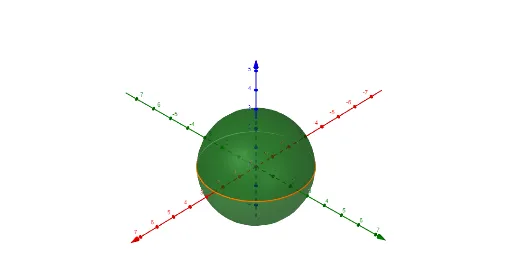
① This GeoGebra example visualizes a sphere as a solid of revolution, showing how a planar curve rotated around an axis generates a 3D solid. ② Core mathematical concepts include solids of revolution, sphere equations, parametric curves and surfaces, and 3D coordinate transformations. ③ Construction uses the CurveCartesian command to define a semicircle or arc, and the Surface command to revolve it around an axis; objects b, a, c control parameters such as radius and rotation angle, allowing dynamic adjustment via sliders. ④ Ideal for high school or early college students studying solid geometry and calculus (volume/surface area of revolution), and for educators creating interactive math demonstrations.
GeoGebra Commands & Parameters
CurveCartesian((2.5 * cos(t)), (2.5 * sin(t)), t, 0, (2 * pi)) → aSurface(a, b, xAxis) → c
AI Drawing Prompt Reference
Create a 3D visualization of a sphere as a solid of revolution. Start with a semicircular arc in the xy-plane, having a radius of 2.5, spanning from angle 0 to 2π. Then revolve this arc around the x-axis to generate a complete sphere. The sphere's radius is fixed by the arc, while a slider controls the rotation angle, allowing dynamic viewing of the revolution process. Include coordinate axes, the original arc, and the resulting spherical surface, with a perspective view suitable for demonstrating how a planar curve sweeps out a 3D solid. The scene should emphasize the relationship between the generating curve and the final solid, ideal for educational purposes in calculus or solid geometry.
The prompt above was compiled from the original drawing commands and is for reference only.