
Smallest Possibility?
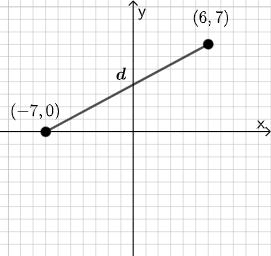
Loading the math board and drawing, please wait…
In collections
Open Middle: Distance in the Coordinate Plane (2)
This example demonstrates the dynamic geometric relationship between parallelograms and tangent functions. It involves core math concepts like mode, parallelogram properties, tangent function characteristics, piecewise functions, and hypothesis testing. Construction highlights GeoGebra commands: PointIn, Segment, SurdText, Textfield, Point, If, Mode, Intersect, Polygon, Angle. Suitable for high school and above learners exploring the intersection of functions and geometry.
GeoGebra Commands & Parameters
PointIn(e) → APointIn(e) → BSegment(A, B) → fSurdText(f) → text1Textfield(j) → InputBox1Textfield(k) → InputBox2Point(Circle[A, sqrt((100 * j) + (10 * k) + o)]) → CSegment(A, C) → lIf(m < i, "Too short!", m > i, "Too long!", "This value is correct!") → text7Mode(l1) → l2Intersect(eq1, p) → DPolygon(A, D, B) → t1, b_1, a_1, d_1Segment(A, D) → qSegment(D, B) → rAngle(B, D, A) → αTextfield(o) → InputBox3If(Length[l2] ≟ 0, "All digits are different!", "Some digits repeat.") → text8
AI Drawing Prompt Reference
Create a dynamic geometric illustration showing the relationship between parallelograms and tangent functions. Start by drawing a segment and labeling its length, then construct a circle based on input values and find its intersection with the segment. Next, form a parallelogram using the intersection point, display text messages indicating whether the segment length meets certain criteria, measure the interior angle of the parallelogram, and show different text results based on whether the digits of an input value repeat.
The prompt above was compiled from the original drawing commands and is for reference only.