
Smallest and Largest Values (Part 1)
Loading the math board and drawing, please wait…
In collections
Open Middle: Interior and Exterior Angles of Triangles
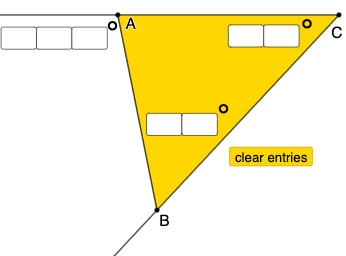
This example demonstrates how to explore the smallest and largest values in hyperbolas, trigonometric functions, and solids using GeoGebra. Key mathematical concepts include hyperbolas, trigonometric functions, and solids. Using commands like Textfield, Intersect, Point, Line, Ray, Segment, Rotate, Angle, Polygon, etc., complex geometric shapes can be constructed. Suitable for high school mathematics education and learning.
GeoGebra Commands & Parameters
Textfield(a) → InputBox1Textfield(b) → InputBox2Textfield(c) → InputBox3Textfield(d) → InputBox4Textfield(f) → InputBox5Textfield(g) → InputBox6Textfield(h) → InputBox7Intersect(xAxis, yAxis) → APoint(xAxis) → CLine(A, C) → iRay(C, A) → jRay(C, B) → kSegment(B, A) → lRay(D, E) → mRotate(E, (((10 * d) + f) * π / 180), D) → E'Ray(D, E') → nAngle(E, D, E') → αPoint(n) → FRotate(D, (((10 * g) + h) * π / 180), F) → D'Ray(F, D') → pAngle(D, F, D') → βIntersect(m, p) → GRotate(F, ((-((100 * a) + (10 * b) + c)) * π / 180), G) → F'Ray(G, F') → qSegment(F, G) → rAngle(F', G, F) → γPolygon(F, D, G) → t1, g_1, f_1, d_1Polygon(A, B, C) → t2, b_1, a_1, c_1Mode(l1) → l2
AI Drawing Prompt Reference
Draw a hyperbola and a line i through points A and C. Construct rays j and k from point C, and a segment l from point B to point A. Then rotate points E and D to generate new points E' and D', and construct angles α, β, and γ. Finally, use these points to construct two triangles t1 and t2, and a segment r.
The prompt above was compiled from the original drawing commands and is for reference only.