
Sloped Cylinder Unfolding
Loading the math board and drawing, please wait…
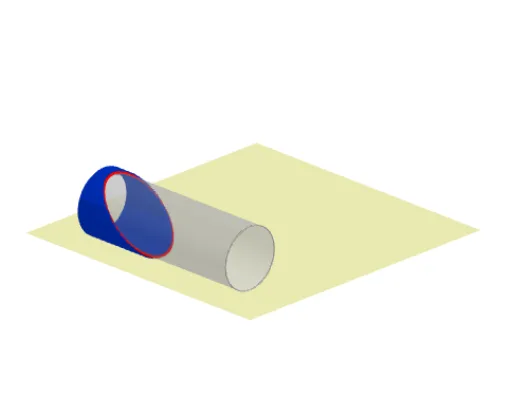
This example demonstrates the unfolding process of a sloped cylinder. Key mathematical concepts include cylinders, ellipses, and the development surface. Construction highlights the use of Line, OrthogonalPlane, Segment, Rotate, and other GeoGebra commands. Suitable for high school mathematics education or students learning solid geometry.
GeoGebra Commands & Parameters
Line(E_1, yAxis) → g_1OrthogonalPlane(E_1, xAxis) → eSegment((0, 0, 0), (h, 0, 0)) → fRotate(e, α, g_1) → e_1Sequence((0, ((i * π) * r / 180), 0), i, 0, 359) → L9Sequence(Rotate[f, i°, Line[M_1, M_2]], i, 0, 359) → LSequence(Intersect[e_1, Element[L, i]], i, 1, 360) → L1Cylinder((0, 0, r), (h, 0, r), r) → b, b_2, b_3, b_4Conic(Element[L1, 1], Element[L1, 91], Element[L1, 181], Element[L1, 271], Element[L1, 330]) → dSequence(Rotate[(0, 0, 0), i°, Line[M_1, M_2]], i, 1, 359) → L2If(Defined[d], Sequence[Segment[Element[L1, i], Element[L2, i]], i, 1, 359]) → L3Sequence(Rotate[(h, 0, 0), i°, Line[M_1, M_2]], i, 1, 359) → L4Sequence(Segment[Element[L1, i], Element[L4, i]], i, 1, 360) → L5Translate(b_3, Vector[(0, abw, 0)]) → gTranslate(Line[M_1, M_2], Vector[(0, abw, 0)]) → jRotate(A, ((((-abw)) / π * 180 / r))°, j) → A'Cylinder(g, (-h)) → i, k, lSegment(A', B) → mSequence(Element[L9, i] + (x(Element[L1, i]), 0, 0), i, 1, 360) → L14Sequence(Element[L14, i], i, 1, o) → L17Rotate(d, γ, g_1) → d'Sequence(Rotate[E, i°, j], i, 0, 359) → L7Sequence(Translate[Element[L3, i], Vector[Element[L2, i], Element[L7, i]]], i, 1, 360) → L8Sequence(Translate[Element[L3, i], Vector[Element[L2, i], Element[L9, i]]], i, 1, 360) → L10Sequence(Element[L7, i] + (x(Element[L1, i]), 0, 0), i, 1, 360) → L15Sequence(Element[L15, i], i, o + 1, 360) → L16Sequence(Element[L8, i], i, o + 1, 359) → L13If(Defined[d], 1, 0) → defPolygon((-4, -4, 0), (h + 4, -4, 0), (h + 4, ((2 * π) * r) + 4, 0), (-4, ((2 * π) * r) + 4, 0)) → v2, p, q, s, tTranslate(L7, Vector[E, A']) → L7'Sequence(Element[L7', i], i, o + 1, 359) → L6Vector((0, 0, (2 * r) + 1), (a, 0, (2 * r) + 1)) → uVector((a, 0, (2 * r) + 1), (0, 0, (2 * r) + 1)) → vSegment((0, 0, 0), (0, 0, (2 * r) + 1.5)) → cSegment((a, 0, 0), (a, 0, (2 * r) + 1.5)) → f_1Sequence(Element[L10, i], i, 1, o - 1) → L12Segment(D, A) → nSegment((0, 0, 0), D) → h_1
AI Drawing Prompt Reference
Draw the unfolding of a sloped cylinder. Start by drawing a cylinder with radius r and height h, then create an ellipse as the side unfolding. Draw a line along the y-axis and rotate it to form a sloped plane. Rotate and project the cylinder's side onto this sloped plane to form the ellipse. Finally, use rotations and translations to reassemble the ellipse and cylinder side to complete the unfolding shape.
The prompt above was compiled from the original drawing commands and is for reference only.