
Slope of a Straight Line
Loading the math board and drawing, please wait…
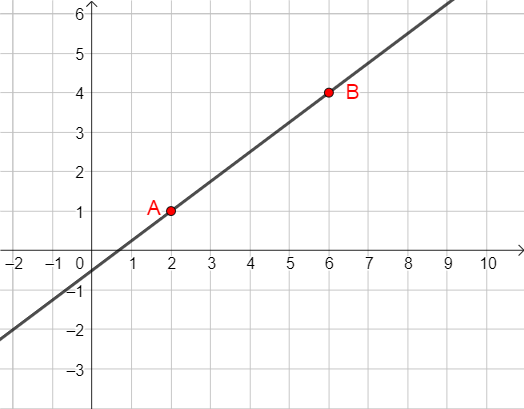
This example demonstrates how to calculate the slope of a straight line using two points. Core math concepts include the slope formula, coordinate geometry, and distance between two points. It utilizes GeoGebra commands like Line, Sequence, If, and objects such as textUndefined, B, A to dynamically illustrate the slope calculation process. Suitable for high school mathematics teaching, focusing on the application of slope in analytical geometry.
GeoGebra Commands & Parameters
Line(A, B) → fSequence(Vector[A + (sgn(x(B) - x(A)) * (i, 0)), A + (sgn(x(B) - x(A)) * (i + 1, 0))], i, 0, abs(x(B) - x(A)) - 1) → l1Sequence(Vector[(x(B), y(A)) + (sgn(y(B) - y(A)) * (0, i)), (x(B), y(A)) + (sgn(y(B) - y(A)) * (0, i + 1))], i, 0, abs(y(B) - y(A)) - 1) → l2Sequence(Vector[B + (sgn(x(A) - x(B)) * (i, 0)), B + (sgn(x(A) - x(B)) * (i + 1, 0))], i, 0, abs(x(B) - x(A)) - 1) → l3Sequence(Vector[(x(A), y(B)) + (sgn(y(A) - y(B)) * (0, i)), (x(A), y(B)) + (sgn(y(A) - y(B)) * (0, i + 1))], i, 0, abs(y(B) - y(A)) - 1) → l4If(¬b', x(Corner[text4, 2] - Corner[text4, 1]), x(Corner[text1, 2] - Corner[text1, 1])) → length2If(step1 ∧ b ∧ (GCD[run, rise] ≠ 1 ∨ AtoB ∧ (run < 0 ∨ rise < 0) ∨ BtoA ∧ (run' < 0 ∨ rise' < 0) ∨ abs(run) ≟ 1), true, false) → showstep2
AI Drawing Prompt Reference
Draw a straight line with two endpoints A and B. Mark points C and D to represent horizontal and vertical directions from A to B. Draw a rectangle containing points A, B, C, and D. Add a text label to indicate the slope of the line. Ensure the drawing is clear and aligned.
The prompt above was compiled from the original drawing commands and is for reference only.