
Sketching Derivatives of Functions
Loading the math board and drawing, please wait…
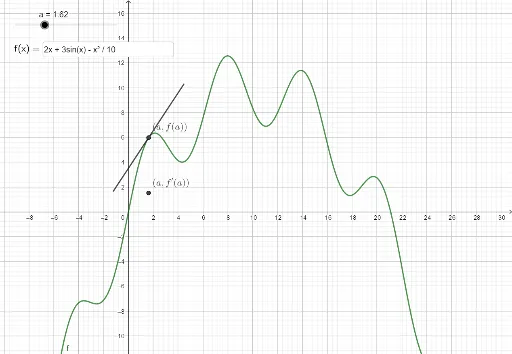
This example demonstrates how to sketch the derivative of a given function. Key mathematical concepts include derivatives and function graphs. Using GeoGebra commands such as Textfield, Corner, and Segment, the function and its derivative can be constructed. Suitable for high school mathematics education and learning.
GeoGebra Commands & Parameters
Textfield(f) → InputBox1Corner(3) → C_{tr}Corner(1) → C_{bl}Segment(A, A + ((x(C_{tr}) - x(C_{bl})) / 8; atan(f'(a)))) → hSegment(A, A - ((x(C_{tr}) - x(C_{bl})) / 8; atan(f'(a)))) → i
AI Drawing Prompt Reference
Draw a function and its derivative. First, input the function expression, then locate the inflection point of the function graph, draw the tangent line passing through the inflection point, calculate the slope of the tangent line, and finally draw a line segment with an angle to the positive x-axis based on the slope.
The prompt above was compiled from the original drawing commands and is for reference only.