
Six Trigonometric Functions Quick Illustrator
Loading the math board and drawing, please wait…
In collections
Trigonometric Functions of Angles
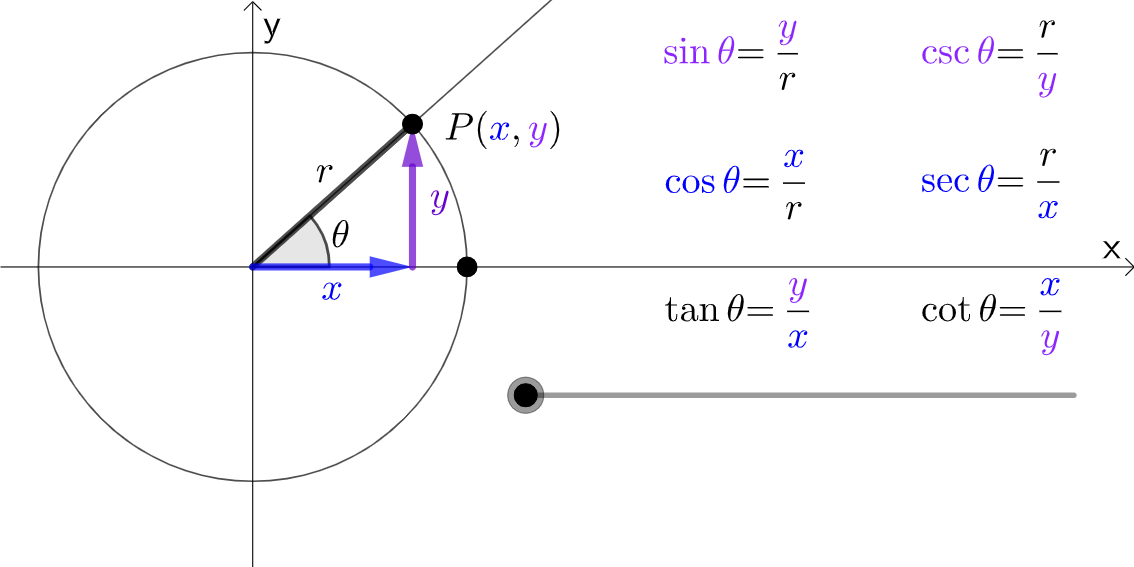
This example demonstrates the definitions and relationships of the six trigonometric functions (sine, cosine, tangent, cosecant, secant, cotangent) on the unit circle. It involves core mathematical concepts such as trigonometric functions, unit circle, angles, vectors, and geometric constructions. The construction uses GeoGebra commands like Point, Intersect, Circle, Ray, Angle, OrthogonalLine, Vector, and Segment. It is suitable for high school students learning the basic properties and interrelations of trigonometric functions.
GeoGebra Commands & Parameters
Point(Ray[(0, 0), (1, 0)]) → AIntersect(xAxis, yAxis) → BCircle(B, A) → cPoint(c) → CRay(B, C) → fAngle(A, B, C) → αOrthogonalLine(C, xAxis) → gIntersect(g, xAxis) → DVector(B, D) → uVector(D, C) → vSegment(B, C) → h
AI Drawing Prompt Reference
Draw the unit circle with six trigonometric functions: Start by drawing a horizontal ray from the origin, determine the center B and point A, and draw the unit circle c with B as the center and A as the radius. Take a point C on circle c, draw a ray f from B, forming angle α with the x-axis. Construct a perpendicular line g from C to the x-axis, intersecting at point D. Connect BD and DC to get vectors u and v. Finally, connect B and C to form segment h.
The prompt above was compiled from the original drawing commands and is for reference only.