
Sine Rule - Two Triangle Constructions
Loading the math board and drawing, please wait…
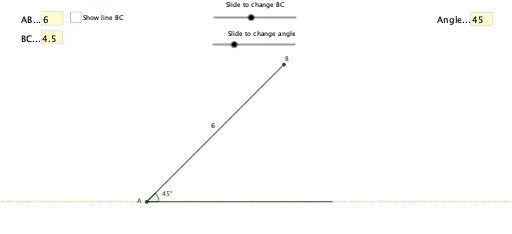
This GeoGebra example dynamically demonstrates the sine rule through two distinct triangle constructions, illustrating the ambiguous case where given two sides and a non-included angle can yield two possible triangles. The core mathematical concept is the sine rule (a/sin A = b/sin B = c/sin C) and the conditions for the existence and number of triangle solutions. The construction uses interactive Textfield and InputBox elements for user input, Circle and Intersect commands to locate the two possible positions of vertex C (C_1 and C_2), Segment, Line, and Rotate to build the triangle sides and angles, and Angle to label the relevant angles. This resource is ideal for high school students learning trigonometry and solving triangles, as well as for teachers demonstrating the geometric interpretation of the sine rule and the discussion of ambiguous cases.
GeoGebra Commands & Parameters
Textfield(l_1) → InputBox1Intersect(xAxis, yAxis) → ACircle(A, l_1) → cSegment(A, Base) → fTextfield(a) → InputBox2Rotate(Base, a°, A) → Base'Angle(Base, A, Base') → αLine(Base', A) → gIntersect(c, g) → B, DSegment(B, A) → hCircle(B, l_2) → dIntersect(d, f) → C_1, C_2Segment(B, C_1) → iSegment(B, C_2) → jSegment(C_2, A) → kSegment(C_1, A) → lAngle(B, C_2, A) → βAngle(B, C_1, A) → γLine(A, C_2) → mTextfield(l_2) → InputBox3
AI Drawing Prompt Reference
Draw two triangles with given two sides and a non-included angle, demonstrating two possible triangle positions. Start by creating point A, then input side length a to rotate the base to get Base', calculate angle α, draw line g, and find intersection points B and D with circle c. Next, input side length b to draw circle d, and find intersection points C1 and C2 with line f. Finally, connect the points to form the triangles.
The prompt above was compiled from the original drawing commands and is for reference only.