
Comprehensive Circle Theorems: Inscribed Angles, Tangents, and Intersecting Chor
Loading the math board and drawing, please wait…
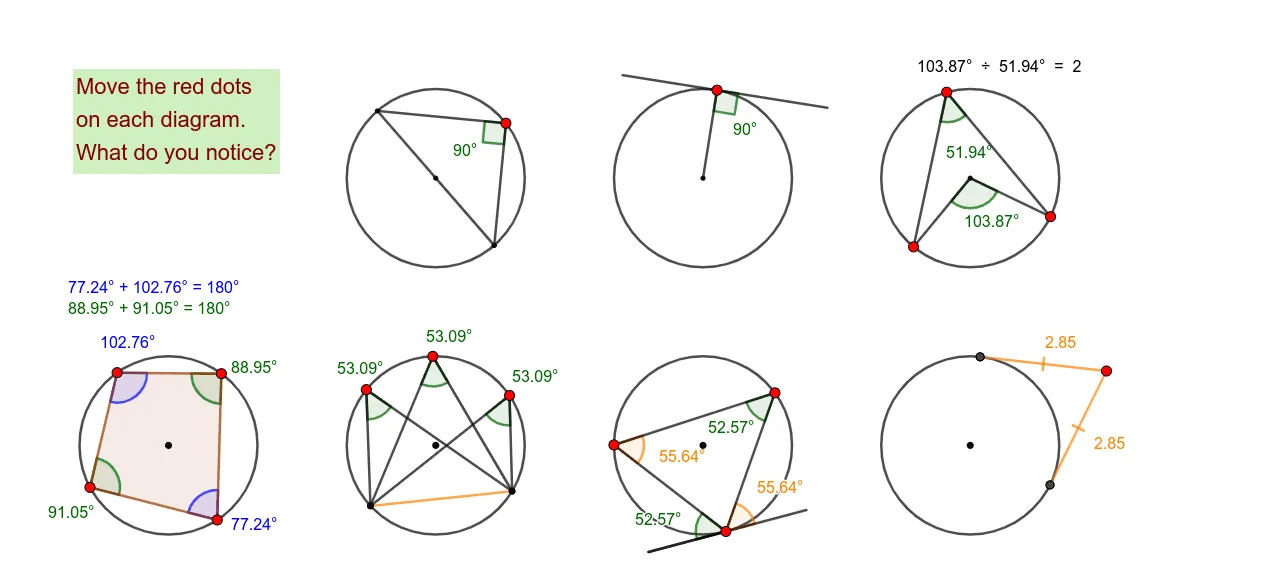
① This GeoGebra example dynamically demonstrates multiple classic circle theorems, including the inscribed angle theorem, tangent properties, intersecting chords theorem, and angle relationships in cyclic polygons. ② Core mathematical concepts involve circles, angles, tangents, segment ratios, polygon interior angles, and auxiliary constructions for geometric proofs. ③ Construction highlights: Based on the summary, commands such as Point, Circle, Line, Intersect, Segment, Angle, OrthogonalLine, Polygon, and Tangent are used, creating numerous points (A, B, C, D, E, etc.), circle c, lines f, g, h, segments, angles α, β, γ, δ, and polygons, with tangent t1 and orthogonal lines to establish perpendicular relationships, forming a complete environment for theorem verification. ④ Suitable for middle and high school geometry classes, this resource helps students intuitively explore circle properties, observe patterns before formal proofs, and dynamically verify geometric conclusions. It is ideal for teacher demonstrations or student-led inquiry.
GeoGebra Commands & Parameters
Point(yAxis) → APoint(yAxis) → BCircle(A, B) → cPoint(c) → CLine(C, A) → fIntersect(c, f) → D, ESegment(E, C) → gPoint(c) → FSegment(C, F) → hSegment(E, F) → iAngle(E, F, C) → αCircle(G, H) → dPoint(d) → ILine(G, I) → jOrthogonalLine(I, j) → kPoint(k) → JPoint(k) → KSegment(J, K) → lSegment(G, I) → mPoint(l) → LPolygon(I, G, L) → t1, l_1, i_1, g_1Angle(t1) → β, γ, δCircle(M, N) → ePoint(e) → OPoint(e) → PPoint(e) → QSegment(O, P) → nSegment(M, P) → pSegment(M, Q) → qSegment(Q, O) → rAngle(P, M, Q) → εAngle(P, O, Q) → ζPoint(yAxis) → RPoint(yAxis) → SCircle(R, S) → sPoint(s) → TPoint(s) → UPoint(s) → VPoint(s) → WPoint(s) → ZSegment(U, Z) → tSegment(Z, W) → aSegment(W, U) → bSegment(U, V) → f_1Segment(V, W) → h_1Segment(W, T) → j_1Segment(T, U) → k_1Angle(U, T, W) → ηAngle(U, Z, W) → θAngle(U, V, W) → ιCircle(A_1, B_1) → c_1Point(c_1) → C_1Point(c_1) → D_1Point(c_1) → E_1Line(A_1, C_1) → m_1OrthogonalLine(C_1, m_1) → n_1Point(n_1) → F_1Point(n_1) → G_1Segment(F_1, G_1) → p_1Segment(C_1, D_1) → q_1Segment(D_1, E_1) → r_1Segment(E_1, C_1) → s_1Segment(C_1, F_1) → t_1Angle(E_1, D_1, C_1) → κAngle(E_1, C_1, F_1) → λAngle(C_1, E_1, D_1) → μAngle(p_1, q_1) → νCircle(H_1, I_1) → d_1Tangent(J_1, d_1) → a_1, b_1Intersect(d_1, b_1) → K_1Intersect(d_1, a_1) → L_1Intersect(d_1, a_1, 1) → M_1Intersect(a_1, b_1) → N_1Intersect(d_1, b_1, 1) → O_1Intersect(a_1, b_1) → P_1Segment(J_1, K_1) → e_1Segment(J_1, L_1) → f_2Circle(Q_1, R_1) → c_2Point(c_2) → S_1Point(c_2) → T_1Point(c_2) → U_1Point(c_2) → V_1Polygon(S_1, T_1, U_1, V_1) → q1, s_2, t_2, u_1, v_1Angle(q1) → ο, ρ, σ, τ
AI Drawing Prompt Reference
Draw a geometry figure combining three circles with chords, secants, and key angle markings. First, choose two points to define the first circle, pick additional points on the circle, and draw a line through one chosen circle point so it intersects the circle at two other points. Connect the relevant endpoints to form a chord, then mark several angles determined by three specific points on the circle (inscribed-angle style). Next, construct a second circle from two points, take a line through its points, construct an orthogonal line to that line at the given point, and connect points to form a polygon around the circle point; include the associated angle(s). Finally, construct a third circle with multiple points on it, connect several of them with segments to form a small polygonal configuration, and label an angle using three of those circle points, highlighting angle relations and the perpendicular construction.
The prompt above was compiled from the original drawing commands and is for reference only.