
Sine Law Explorer: Dynamic Triangle Side-Angle Relations
Loading the math board and drawing, please wait…
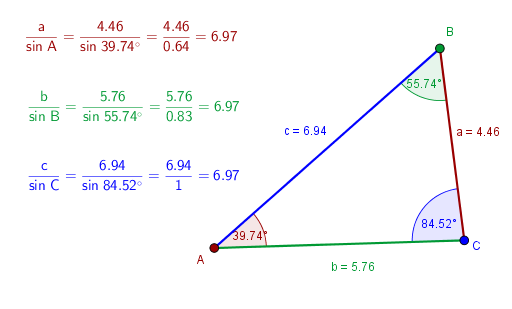
This interactive GeoGebra example dynamically demonstrates the Sine Law (a/sinα = b/sinβ = c/sinγ) by allowing users to adjust a triangle's sides and angles in real time. It visualizes how each side length is proportional to the sine of its opposite angle, reinforcing the fundamental relationship in trigonometry. Core concepts include the triangle angle sum theorem, the sine rule, and the geometric interpretation of sine via the unit circle. The construction uses GeoGebra's Segment command to create sides a, b, c, and Angle command to label interior angles α, β, γ, with sliders (e.g., maxSize, SideAngle1, SideAngle2, SideAngle3) enabling dynamic manipulation. Suitable for high school trigonometry and pre-calculus students, this tool serves as an exploratory lab for verifying the sine law, understanding ambiguous cases, and building intuition for solving triangles.
GeoGebra Commands & Parameters
Segment(C, B) → aSegment(B, A) → cSegment(C, A) → bAngle(A, B, C) → βAngle(C, A, B) → αAngle(B, C, A) → γ
AI Drawing Prompt Reference
Draw a triangle ABC and observe the relationship between the length of each side and the sine of its opposite angle by adjusting the side lengths and angles. First, draw side BC, then sides AC and AB, and label angles B, A, and C. Finally, add three sliders to control the side lengths and angles, allowing the triangle to change dynamically.
The prompt above was compiled from the original drawing commands and is for reference only.