
Cosine Law Dynamic Exploration
Loading the math board and drawing, please wait…
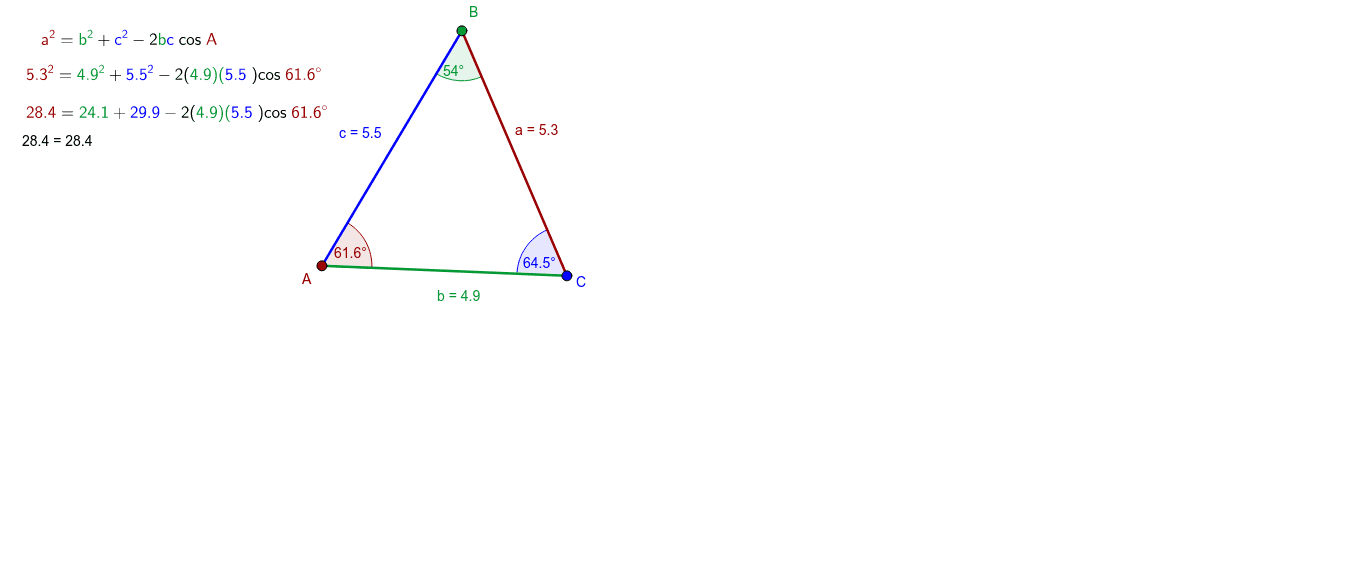
This GeoGebra example dynamically explores the Cosine Law by adjusting triangle side lengths and observing corresponding angle changes. It demonstrates the relationship between side lengths and the cosine of opposite angles in a triangle. Core mathematical concepts include triangle geometry, trigonometric relationships, and the Cosine Law itself. Construction uses GeoGebra commands such as Segment and Angle, with key objects A, B, C, a, b, c, and angle measures α, β, γ. Slider-based controls allow real-time parameter updates. Suitable for high school mathematics, trigonometry courses, and geometry instruction, it helps learners visualize abstract definitions and understand the law's practical derivation.
GeoGebra Commands & Parameters
Segment(C, B) → aSegment(B, A) → cSegment(C, A) → bAngle(A, B, C) → βAngle(C, A, B) → αAngle(B, C, A) → γ
AI Drawing Prompt Reference
Draw a triangle ABC with points A and B fixed, and point C movable. The sides a, b, c correspond to segments CB, BA, and AC respectively. The angles β, α, γ correspond to angles ABC, CAB, and BCA. Adjusting point C allows observing changes in side lengths and angles.
The prompt above was compiled from the original drawing commands and is for reference only.