
Sine Law - Ambiguous Case Exploration
Loading the math board and drawing, please wait…
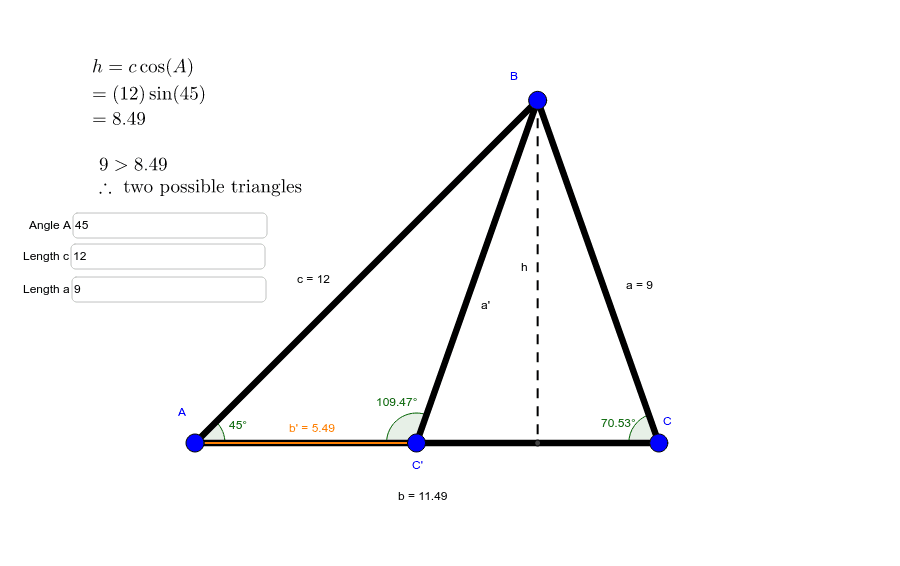
This example demonstrates the ambiguous case of the sine law in triangle geometry, where given two angles and one side, there might be two possible triangles. It involves core math concepts like the sine law, triangle uniqueness, geometric construction, and judgment. Constructed using GeoGebra commands/objects such as Segment, Textfield, Line, Angle, Circle, Point. Suitable for high school or university introductory mathematics education to understand the limitations and practical applications of the sine law.
GeoGebra Commands & Parameters
Segment(B, D) → hTextfield(angleA) → inputBox1Textfield(c_1) → inputBox2Segment(A, B) → cLine(A, D) → eAngle(B, A, D) → αTextfield(a_1) → inputBox3Segment(B, C) → aSegment(A, C) → bAngle(B, C, D) → βCircle(B, a_1) → fPoint(f) → ESegment(B, E) → gSegment(B, C') → a'Segment(C', A) → b'Angle(B, A, C') → γAngle(B, C', A) → δ
AI Drawing Prompt Reference
Draw a triangle with one fixed side and two adjustable sides. From one endpoint of the fixed side, draw a ray forming an adjustable angle with the base. With the other endpoint as center, draw a circle whose radius equals an adjustable side length. The circle intersects the ray at two possible points, each connected to the center to form two distinct triangles. Include input boxes for the angle and side lengths, and sliders to adjust parameters. Label all interior angles of both triangles to illustrate the ambiguous case of the sine law.
The prompt above was compiled from the original drawing commands and is for reference only.