
Sine/Cosine Waves from the Unit Circle
Loading the math board and drawing, please wait…
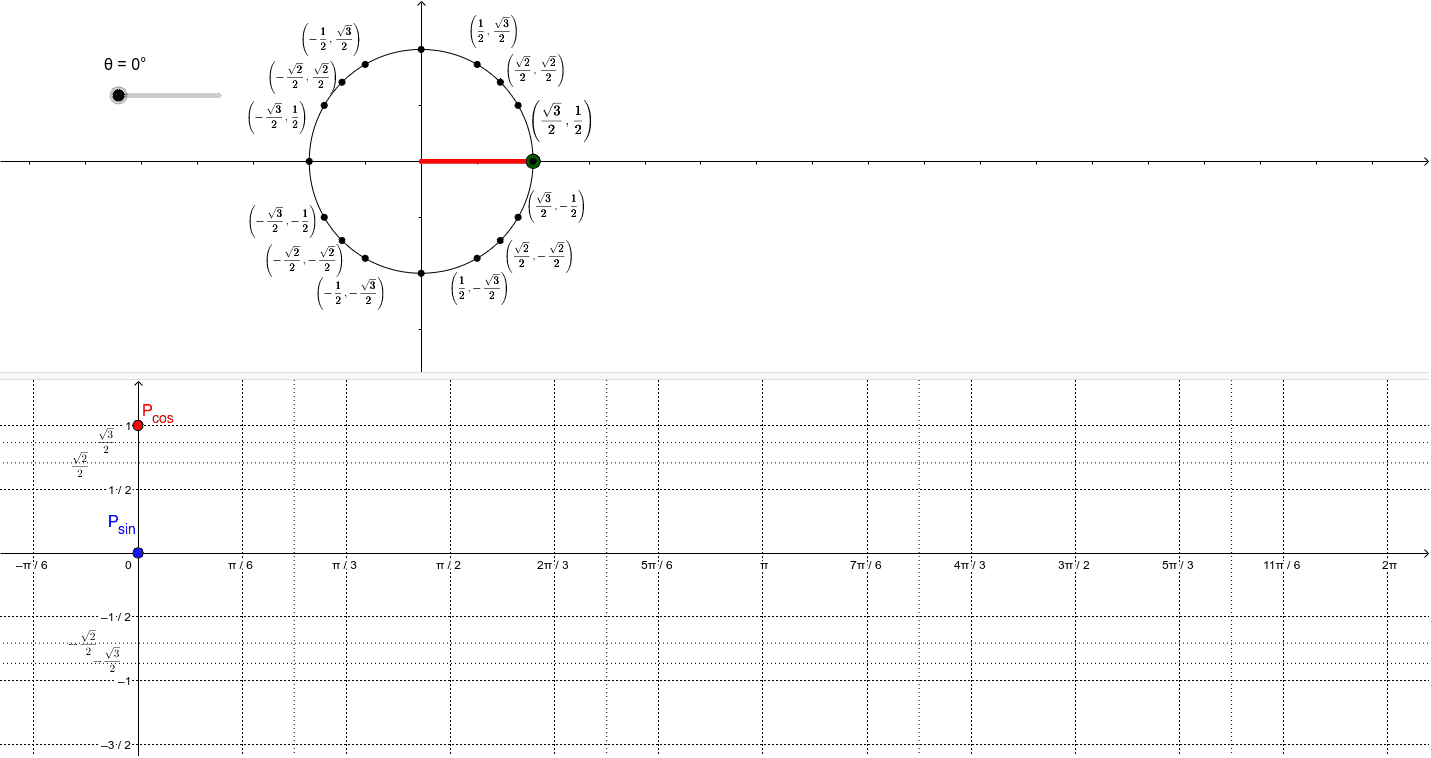
This example demonstrates how to derive sine and cosine waves from the unit circle. It involves core concepts of trigonometry, dynamically showing the graphs of sine and cosine functions through rotation and intersection operations. Commands used include rotation, angle, segment, and orthogonal line. Suitable for high school mathematics education, particularly for trigonometry and function graphing.
GeoGebra Commands & Parameters
Intersect(c, xAxis, 2) → AIntersect(xAxis, yAxis) → BRotate(A, θ, B) → A'Angle(A, B, A') → αSegment(B, A') → fOrthogonalLine(A', xAxis) → gIntersect(g, xAxis) → CSegment(A', C) → hSegment(C, B) → iIntersect(l, yAxis) → TIntersect(j, yAxis) → UIntersect(k, yAxis) → VIntersect(m, yAxis) → W
AI Drawing Prompt Reference
Draw a unit circle and derive sine and cosine waveforms from it. Start by drawing the intersection point A of the unit circle and the x-axis, and then draw the origin B. Rotate point A around B to get A', and calculate the angle α between A and A'. Draw the line segment f from B to A'. Construct the perpendicular line g from A' to the x-axis, and draw the line segments h from A' to C and i from C to B, where C is the intersection of g and the x-axis. Finally, use rotation and intersection operations to show the sine and cosine waveforms.
The prompt above was compiled from the original drawing commands and is for reference only.