
Sine - Chord - Tangent - Secant
Loading the math board and drawing, please wait…
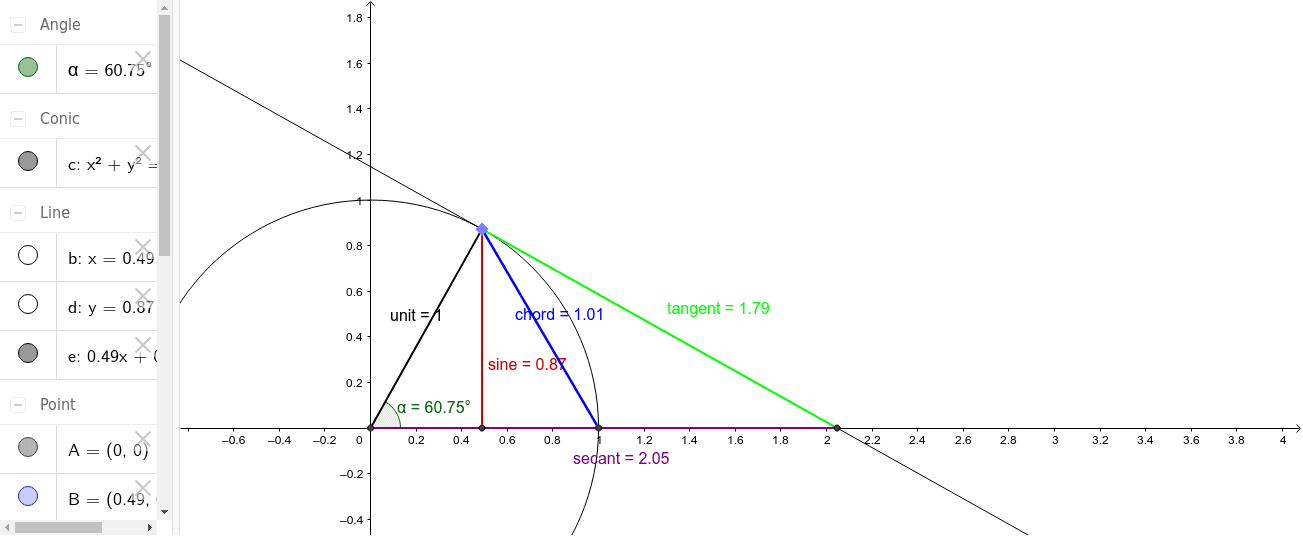
This example demonstrates the basic graph of the sine function. It involves core trigonometric concepts, using commands like Intersect, Circle, Point, Segment, OrthogonalLine, Tangent, and Angle to construct chords, tangents, and secants on a unit circle. Suitable for high school mathematics education and learning.
GeoGebra Commands & Parameters
Intersect(xAxis, yAxis) → ACircle(A, 1) → cPoint(c) → BSegment(A, B) → unitOrthogonalLine(B, xAxis) → bOrthogonalLine(B, yAxis) → dIntersect(b, xAxis) → XIntersect(d, yAxis) → YTangent(B, c) → e,Intersect(e, xAxis) → ξIntersect(e, yAxis) → φSegment(X, B) → sineAngle(X, A, B) → αIntersect(c, xAxis, 2) → CSegment(B, C) → chordSegment(ξ, B) → tangentSegment(A, ξ) → secant
AI Drawing Prompt Reference
Draw a unit circle and mark its center. Take a point B on the circle. Connect the center to B to form a diameter. Draw a tangent line at B and mark its intersections with the x-axis and y-axis. From B, draw perpendicular lines to the x-axis and y-axis, marking the points X and Y. Finally, connect X to B to form the sine line, B to the second intersection of the circle with the x-axis to form the chord, B to the intersection of the tangent with the x-axis to form the tangent line, and A to the intersection of the tangent with the x-axis to form the secant line. Mark these lines and angles.
The prompt above was compiled from the original drawing commands and is for reference only.