
Sine Angle Sum Identity by Chris Patterson
Loading the math board and drawing, please wait…
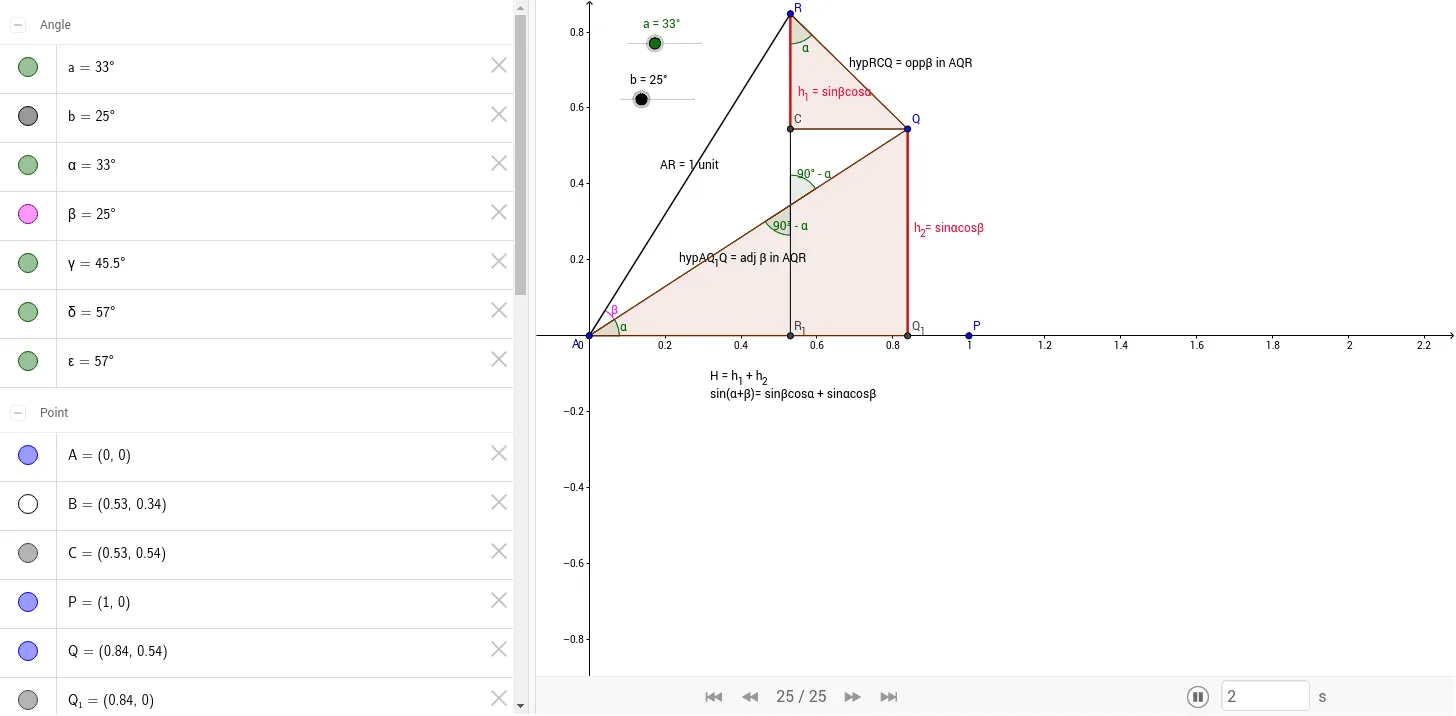
This example demonstrates the sine angle sum identity by rotating a square. Students can derive the height formula of a vertex. Core math concepts include trigonometry and geometric transformations. GeoGebra commands used include Rotate, Angle, Segment, Intersect, and Polygon. Suitable for middle school and above students learning trigonometry and geometric transformations.
GeoGebra Commands & Parameters
Rotate(P, a, A) → QAngle(P, A, Q) → αRotate(Q, b, A) → RAngle(Q, A, R) → βSegment(A, Q) → cSegment(Q, R) → dSegment(A, R) → eSegment(R_1, R) → fIntersect(c, f) → BSegment(R, C) → iAngle(C, R, Q) → γAngle(R_1, B, A) → δAngle(R, B, Q) → εSegment(C, Q) → jPolygon(R, C, Q) → poly1, p', p'', c_1Segment(Q, Q_1) → kPolygon(A, Q, Q_1) → poly2, q_1, a_1, q
AI Drawing Prompt Reference
Draw a square and rotate two angles around one vertex to form two new vertices. Connect these vertices with the original vertex to create a triangle. Use rotation and intersection operations to construct several segments and angles, ultimately forming two polygons.
The prompt above was compiled from the original drawing commands and is for reference only.