
Reference Angle Demo – Exploring Angle and Reference Angle on the Unit Circle
Loading the math board and drawing, please wait…
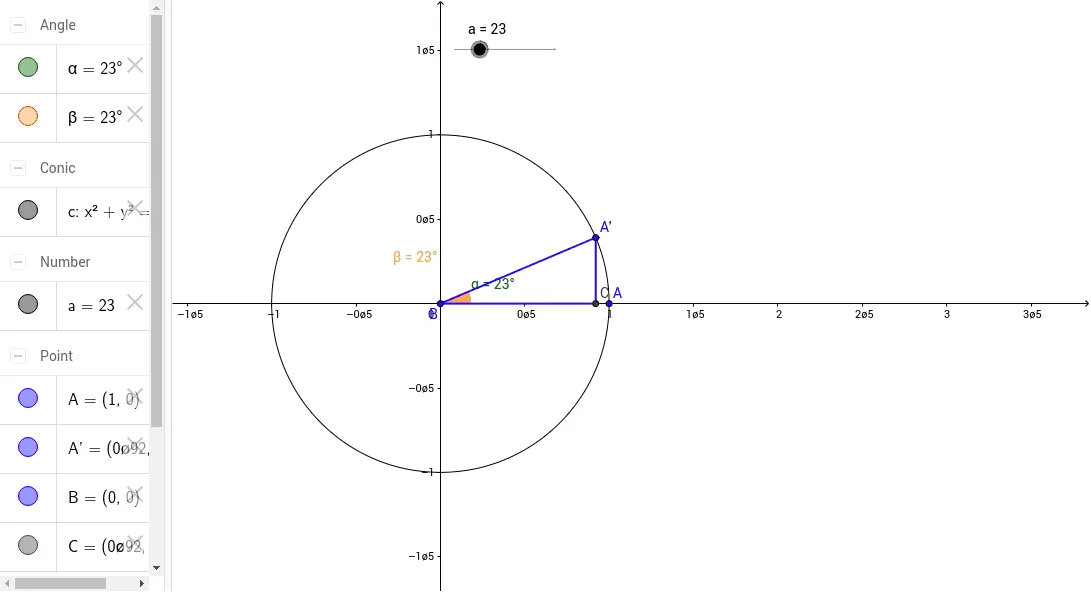
This example uses a slider to control a point on the unit circle, dynamically showing the relationship between the angle and its reference angle.
Core concepts covered include reference angle, principal angle, unit circle, signs of trigonometric functions, and acute angles.
The construction employs GeoGebra commands such as Circle (draw unit circle), Rotate (rotate point to generate corresponding angle), Angle (measure angle), and Segment (connect points to form arc or chord), with objects like circle c, points A, B, A', and angles α, β.
Designed for high school students studying trigonometry, it serves as an effective classroom demonstration or independent exploration tool.
GeoGebra Commands & Parameters
Circle((0, 0), 1) → cRotate(A, a°, B) → A'Angle(A, B, A') → αSegment(B, A') → bSegment(A', C) → dSegment(C, B) → eAngle(A', B, C) → β
AI Drawing Prompt Reference
Please draw a unit circle and mark a point A on the circle. Use a slider to control the rotation angle of point A, generating the corresponding rotated point A'. Connect points B and A' with a line segment, then connect A' to another point C, and finally connect C back to B, forming a triangle. Measure and label the angle between A, B, and A' as α, and the angle between A', B, and C as β. This diagram demonstrates the relationship between an angle and its reference angle, suitable for high school students studying trigonometry.
The prompt above was compiled from the original drawing commands and is for reference only.