
Simplifying Linear Algebraic Expressions
Loading the math board and drawing, please wait…
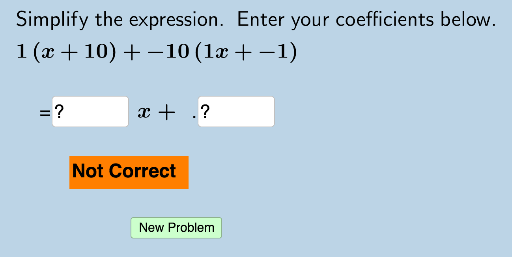
This example demonstrates how to simplify linear algebraic expressions using a random problem generator that provides instant feedback to students. Core math concepts include linear equations, algebraic operations, and expression simplification. Construction highlights the use of GeoGebra's Random command to generate random problems, Textfield objects to display problems and answers, and InputBox1 to InputBox5 for interactive inputs. Suitable for middle school and above mathematics education, reinforcing skills in simplifying linear algebraic expressions.
GeoGebra Commands & Parameters
Random(-10, 10) → aRandom(-10, 10) → cRandom(-10, 10) → wRandom(-10, 10) → bRandom(-10, 10) → dRandom(-10, 10) → eRandom(-10, 10) → fTextfield(a1) → InputBox1Textfield(a2) → InputBox2Random(4, 5) → nTextfield(a3) → InputBox3Textfield(a4) → InputBox4Textfield(a5) → InputBox5Textfield(g) → InputBox6Textfield(h) → InputBox7
AI Drawing Prompt Reference
Create a linear algebraic expression simplification exercise. First, randomly generate four numbers a, c, w, b, d, e, f, then display them in InputBox1 to InputBox5 respectively. Next, randomly generate a number n to indicate how many expressions need to be simplified. Finally, display the problem and answer in InputBox6 and InputBox7, allowing students to input the simplified expressions.
The prompt above was compiled from the original drawing commands and is for reference only.