
Simple Projectile Motion Simulation
Loading the math board and drawing, please wait…
In collections
PD day Applications of Vectors
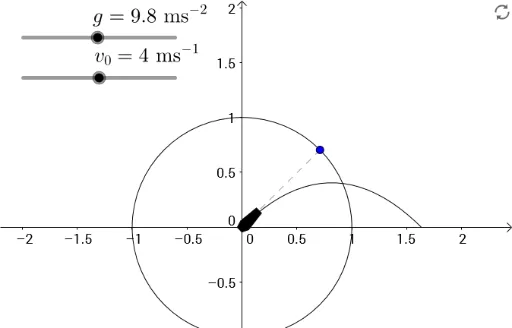
This example demonstrates a simple projectile motion simulation, where sliders control initial speed and launch angle, dynamically showing the parabolic trajectory under gravity. Core math concepts include parametric equations, quadratic functions (parabolas), vector decomposition (horizontal and vertical velocity components), and rotation geometry (for representing velocity direction or object orientation). Construction uses GeoGebra commands such as PointIn, Point, Segment, Polygon, Angle, and Rotate, with objects including speed slider k, angle d, gravity g, multiple points (A, B, C, etc.) and rotated copies (D', E', etc.) to create dynamic or symmetric visuals. Suitable for middle/high school physics or math classes to illustrate projectile motion, function graphing, and geometric transformations, and to explore how initial speed and angle affect range and maximum height.
GeoGebra Commands & Parameters
PointIn(a) → BPoint(d) → ASegment(C, A) → fPolygon(D, E, F, G, H, I) → poly1, d_1, e, f_1, g_1, h, iAngle(J, C, A) → angle1Rotate(D, angle1) → D'Rotate(E, angle1) → E'Rotate(F, angle1) → F'Rotate(G, angle1) → G'Rotate(H, angle1) → H'Rotate(I, angle1) → I'Polygon(D', E', F', G', H', I') → poly1', d', e', f', g', h', i'