
The Parallelogram Formed by Joining Midpoints of a Quadrilateral
Loading the math board and drawing, please wait…
In collections
PD day Applications of Vectors
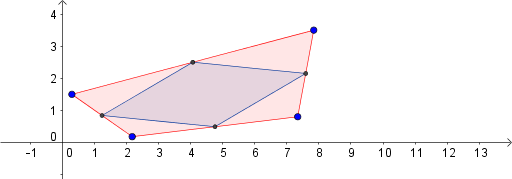
This example demonstrates the classic geometric fact that connecting the midpoints of the sides of any quadrilateral always produces a parallelogram. Core mathematical concepts include midpoints, parallelogram criteria, and properties of inscribed figures within quadrilaterals. Construction steps: use the Polygon command to create the original quadrilateral ABCD, then apply the Midpoint command to obtain the midpoints E, F, G, H of each side, and finally connect these midpoints using the Polygon command to form the new quadrilateral poly2. This construction is suitable for middle school geometry lessons, helping students intuitively understand the midpoint quadrilateral theorem and observe the invariance of parallelogram properties when dragging the original vertices.
GeoGebra Commands & Parameters
Polygon(D, A, B, C) → poly1, d, a, b, cMidpoint(A, D) → EMidpoint(D, C) → FMidpoint(C, B) → GMidpoint(B, A) → HPolygon(H, G, F, E) → poly2, h, g, f, e
AI Drawing Prompt Reference
Draw an arbitrary quadrilateral. Then locate the midpoints of each of its four sides and connect these midpoints in order to form a new quadrilateral inside the original one. Ensure the original vertices are draggable, and the inner quadrilateral always remains a parallelogram. Show the original quadrilateral, the inner parallelogram, and mark the midpoints clearly to illustrate the midpoint quadrilateral theorem.
The prompt above was compiled from the original drawing commands and is for reference only.