
Similarity in Right Triangles (with Ball Bounce!)
Loading the math board and drawing, please wait…
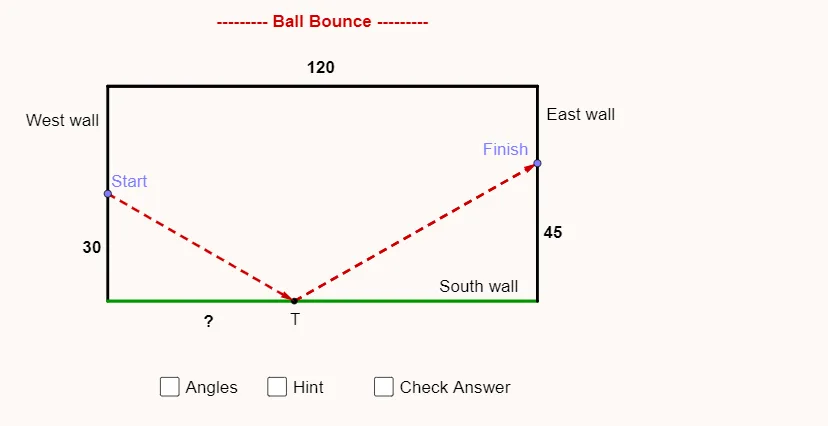
This example demonstrates similarity in right triangles. Key mathematical concepts include similar triangles and right triangles. Using commands from the construction summary, such as Segment, Point, Angle, Mirror, and Vector, we can see how these GeoGebra tools are utilized. Suitable for middle school and above students to learn about the properties and applications of similar triangles.
GeoGebra Commands & Parameters
Segment(A, B) → fSegment(B, C) → gSegment(C, D) → hPoint(f) → EPoint(g) → TSegment(E, T) → iAngle(B, E, T) → αMirror(E, eq1) → E'Point(h) → ISegment(T, I) → kPoint(f) → GPoint(h) → HSegment(G, H) → jAngle(E, T, B) → βAngle(C, T, I) → γVector(E, T) → uVector(T, I) → v
AI Drawing Prompt Reference
Draw a geometric similarity setup in the plane using connected line segments AB, BC, and CD as the main boundary structure. Choose a point E on the segment AB and a point T on the segment BC, then connect E to T. Mark the angle at E formed by rays B–E–T (angle α). Reflect point E across the appropriate line through E to obtain a mirrored point E′, maintaining the intended symmetry relationship. Take a point I on the segment CD, connect T to I, and mark the angle at T formed by rays E–T–B (angle β) and by rays C–T–I (angle γ). Finally, show two vectors: u from E to T and v from T to I.
The prompt above was compiled from the original drawing commands and is for reference only.