
Similar Triangles, Exercise 1
Loading the math board and drawing, please wait…
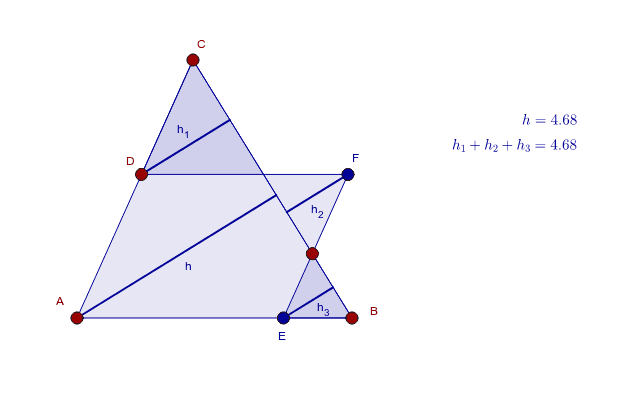
This example demonstrates the properties and criteria of similar triangles through geometric construction. Key math concepts include geometric drawing, similarity theorems, and trigonometric functions. GeoGebra commands like Polygon, Point, Line, Intersect, Segment, and OrthogonalLine are used to create triangles and auxiliary lines. Suitable for high school mathematics instruction or student exploration of geometric problems.
GeoGebra Commands & Parameters
Polygon(A, B, C) → Polygon1, c, a, bPoint(b) → DLine(D, c) → dIntersect(d, a) → E_1Segment(E_1, B) → helpPoint(help) → F_1Line(F_1, b) → eOrthogonalLine(A, a) → fIntersect(d, e) → FIntersect(e, c) → EOrthogonalLine(F, a) → gOrthogonalLine(E, a) → h_4OrthogonalLine(D, a) → iIntersect(i, a) → IIntersect(g, a) → JIntersect(h_4, a) → KIntersect(f, a) → LSegment(A, L) → hSegment(I, D) → h_1Segment(F, J) → h_2Segment(E, K) → h_3Polygon(D, E_1, C) → Polygon2, c_1, d_1, e_1Polygon(F_1, F, E_1) → Polygon3, e_2, f_1, g_1Polygon(E, B, F_1) → Polygon4, f_2, h_5, b_1
AI Drawing Prompt Reference
Draw a triangle. Pick a point on one side and draw a line through it parallel to the opposite side, intersecting another side, forming a smaller triangle. Then pick a point on an auxiliary segment and draw a line through it parallel to another side, intersecting the previous parallel line, yielding two intersection points. From these points, drop perpendiculars to the base and mark the feet. Connect the feet to the corresponding points to form several perpendicular segments. Finally, using these parallels and intersections, construct three similar smaller triangles that share sides or angles with the original, showing the classic parallel-line triangle similarity configuration.
The prompt above was compiled from the original drawing commands and is for reference only.