
Similar Triangles by Malin Christersson
Loading the math board and drawing, please wait…
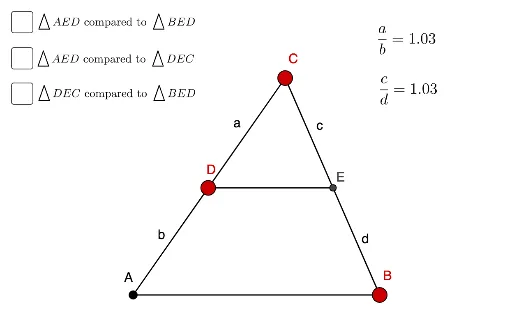
This example demonstrates the properties of similar triangles. By adjusting the sides and angles of the triangles, you can observe that the corresponding sides of similar triangles are proportional and the corresponding angles are equal. The construction uses commands such as Point, Polygon, OrthogonalLine, Intersect, and Segment. Suitable for students at the junior high school level and above to learn about the concepts of similar triangles.
GeoGebra Commands & Parameters
Point(xAxis) → APoint(xAxis) → BPolygon(A, B, C) → t1, c_1, a_1, b_1Point(b_1) → DOrthogonalLine(D, yAxis) → fIntersect(f, a_1) → ESegment(A, D) → bSegment(D, C) → aSegment(C, E) → cSegment(E, B) → dSegment(A, B) → gPolygon(A, E, D) → t2, d_1, a_2, ePolygon(D, B, E) → t3, e_1, d_2, b_2Segment(D, E) → iPolygon(C, D, E) → t4, e_2, c_2, d_3
AI Drawing Prompt Reference
Draw a coordinate plane with a horizontal axis. Place two points on the axis as the base of a large triangle, and add a third point above to form the triangle. Pick a point on one side of the triangle, then draw a line through it perpendicular to the vertical axis, intersecting another side at a new point. Connect the original vertices and these points with segments, subdividing the large triangle into four smaller triangles. The resulting figure shows several triangles with equal corresponding angles and proportional sides, illustrating similarity.
The prompt above was compiled from the original drawing commands and is for reference only.