
Signed Number Visualizations
Loading the math board and drawing, please wait…
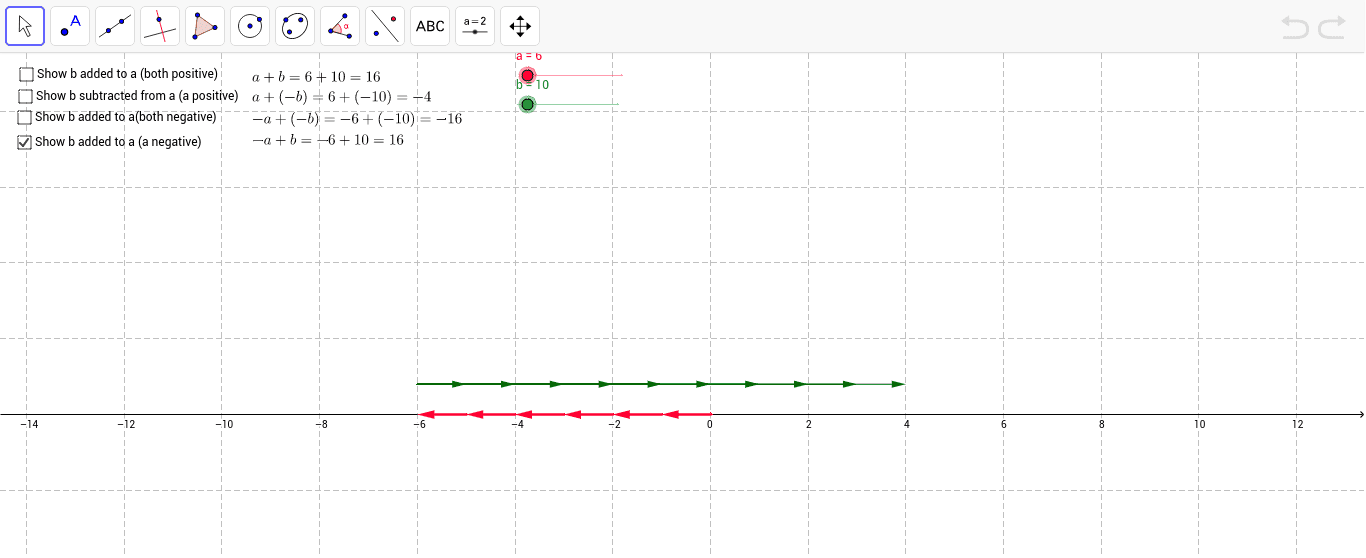
This example demonstrates signed numbers using arrows. It involves core math concepts like signed numbers, number line, and direction. Construction uses commands Sequence and Text with objects like a, list1, b, list2, etc. Ideal for middle school and above to visualize and understand signed numbers in a geometric context.
GeoGebra Commands & Parameters
Sequence(Vector[(t, 0), (t + 1, 0)], t, 0, a - 1) → list1Sequence(Vector[(a + t, 0), (a + t + 1, 0)], t, 0, b - 1) → list2Sequence(Vector[(a, 2), (a - t, 2)], t, 1, b) → list4Text(b, (MeanX[list4], 2), false, true) → text2Sequence(Vector[(-t, 0), (-(t + 1), 0)], t, 0, a - 1) → list5Sequence(Vector[(-a, 2), (-(a - t), 2)], t, 1, b) → list6Sequence(Vector[(t, 0), (t + 1, 0)], t, 0, a - 1) → list1copySequence(Vector[(-t, 0), (-(t + 1), 0)], t, 0, a - 1) → listaneg2Sequence(Vector[(-a, 0), (-a - t, 0)], t, 1, b) → bnegativelist
AI Drawing Prompt Reference
Draw a number line starting from 0, and draw a series of 1-unit arrows to the right to represent positive numbers; then draw a series of 1-unit arrows to the right from a variable point a to represent positive numbers; next, draw a series of 1-unit arrows upwards from a to represent positive numbers; then draw a series of arrows to the left to represent negative numbers; finally, draw a series of arrows to the left from 0 to represent negative numbers, and draw a series of arrows to the left from a to represent negative numbers.
The prompt above was compiled from the original drawing commands and is for reference only.