
Unit Circle Demonstration by Tom Owsiak
Loading the math board and drawing, please wait…
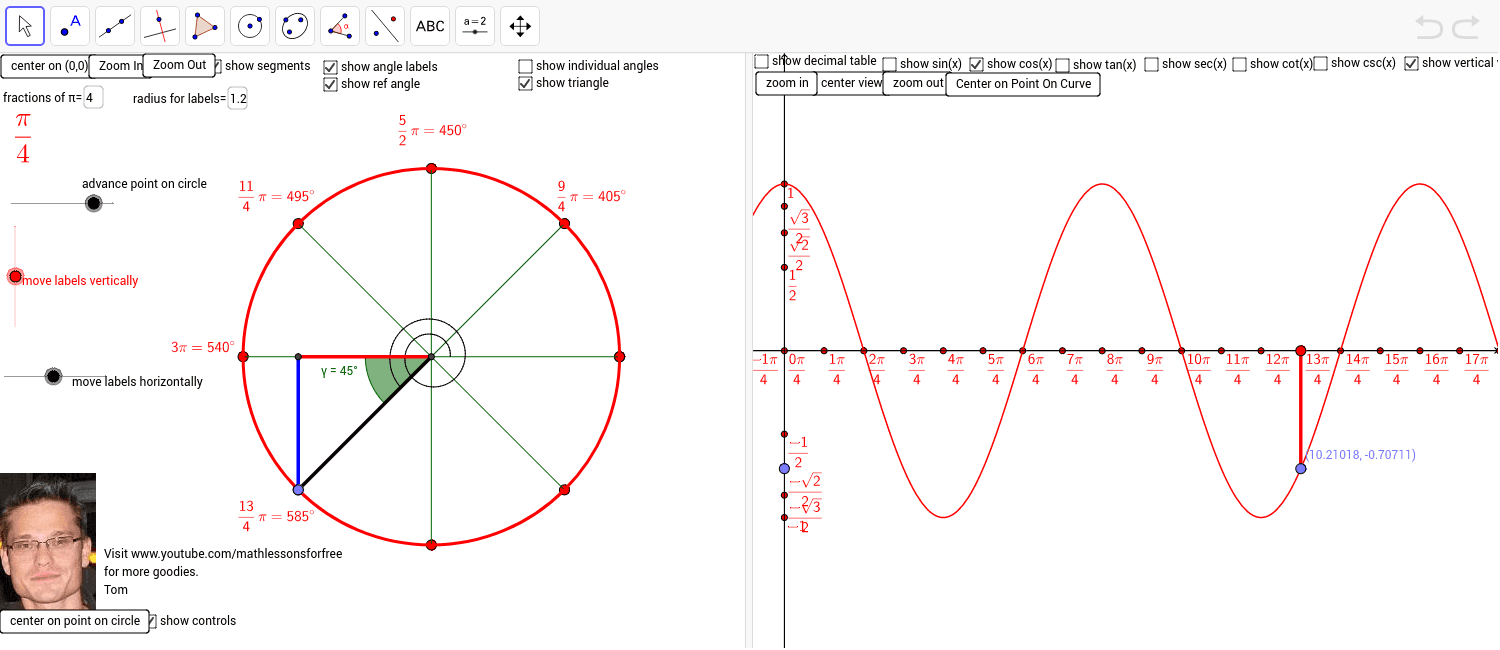
This example demonstrates the construction of the unit circle and its relationship with trigonometric functions. It involves core mathematical concepts including circle, trigonometry (sine, cosine), parametric equations, and coordinate geometry. Key GeoGebra commands used in the construction are Sequence, Intersect, Circle, Textfield, Segment, Simplify, Angle, TrigExpand, Mod, Point, CurveCartesian, TableText, and Text. It is suitable for high school and above students to learn and understand trigonometric functions, coordinate geometry, and parametric equations.
GeoGebra Commands & Parameters
Sequence(FractionText[k / fractionsofpie], k, 1, advancedpointoncircle) → list5Sequence(FractionText[k * 180 / fractionsofpie], k, 1, advancedpointoncircle) → list7Sequence((r * cos(k * π / fractionsofpie), r * sin(k * π / fractionsofpie)), k, 1, advancedpointoncircle) → list3Sequence(Text[(Element[list5, t] * "π=" * Element[list7, t])°, (x(Element[list3, t]) + movlabelshorizontally, y(Element[list3, t]) + movelabelsvertically), false, true], t, 1, 2 * fractionsofpie) → list6Sequence(Text["cos(" * FractionText[k / fractionsofpie] * " π )=", (0, 0), false, true], k, 1, advancedpointoncircle) → list8Intersect(xAxis, yAxis) → ACircle(A, 1) → cTextfield(fractionsofpie) → inputBox1Circle((0, 0), r) → dSequence(Text["$\frac{" * 2 * π * "}{" * fractionsofpie * "}$", Element[list3, t], false, true], t, 1, Length[list3]) → list4FractionText(2 / fractionsofpie * π) → text2Textfield(r) → inputBox2Textfield(advancetriangletonextangle) → inputBox3Segment((0, 0), C) → eSegment(C, B) → fSegment(A, B) → gSimplify(newforcosine) → hSegment(A, B) → iAngle(C, A, B) → αFractionText(2 / fractionsofpie) → text4Angle(E, A, B) → βTrigExpand(sin(2 * x)) → pAngle(C, A, B) → γMod(375, 360) → lSequence((cos(k * π / fractionsofpie), sin(k * π / fractionsofpie)), k, 0, 2 * fractionsofpie) → list1Sequence(Segment[(0, 0), (cos(k * π / fractionsofpie), sin(k * π / fractionsofpie))], k, 1, 2 * fractionsofpie) → list2Dimension(list6) → mDimension(list6) → nPoint(i) → FSequence(Text["\frac{\sqrt{2}}{2}", (k, 0), false, true], k, 1, 4) → list9Sequence(Text[(Element[list5, t] * "π=" * Element[list7, t])°, (x(Element[list3, t]) + movlabelshorizontally, y(Element[list3, t]) + movelabelsvertically), false, true], t, 1, advancedpointoncircle) → list12Sequence(cos(k * π / fractionsofpie), k, 1, advancedpointoncircle) → list13CurveCartesian((1 / 10 + t / 100) * cos(t * π / fractionsofpie), (1 / 10 + t / 100) * sin(t * π / fractionsofpie), t, 0, advancedpointoncircle) → qSequence(Text["sin(" * FractionText[k / fractionsofpie] * " π )=", (0, 0), false, true], k, 1, advancedpointoncircle) → list14Sequence(sin(k * π / fractionsofpie), k, 1, advancedpointoncircle) → list15Sequence(Angle[Element[list1, t], (0, 0), Element[list1, t + 1]], t, 1, Length[list1]) → list17Sequence(Text["tan(" * FractionText[k / fractionsofpie] * " π )=", (0, 0), false, true], k, 1, advancedpointoncircle) → list18Sequence(tan(k * π / fractionsofpie), k, 1, advancedpointoncircle) → list19TableText({list12, list8, list13, list14, list15, list18, list19}, "v") → text5Sequence((r / 3 * cos(π / fractionsofpie * k), r / 3 * sin(π / fractionsofpie * k)), k, 0, 2 * fractionsofpie, 0.5) → list20Sequence(Element[list20, t], t, 0, Length[list20], 2) → list22Sequence(Text["\frac{π}{" * fractionsofpie * "}", (x(Element[list22, k]) + movlabelshorizontally, y(Element[list22, k]) + movelabelsvertically), false, true], k, 1, Length[list22], 1) → list21Sequence(Text[(Element[list5, t] * "π=" * Element[list7, t])°, (x(Element[list3, t]) + movlabelshorizontally, y(Element[list3, t]) + movelabelsvertically), false, true], t, Length[list6] + 1, advancedpointoncircle) → secondsetpiover4Segment((-999.9714194038698, 0), (1000.0285805961302, 0)) → a_1Segment((0, -100), (0, 100)) → b_1Sequence((k * π / fractionsofpie, 0), k, -100, 100) → list23Sequence(Text["\frac{" * k * "π}{" * fractionsofpie * "}", (k * π / fractionsofpie, 0), false, true], k, -100, 100) → list24Sequence(Line[(π / 2 + k * π, 0), (π / 2 + k * π, 1)], k, -100, 100) → list25Text("\frac{\sqrt{2}}{2}", (0, 0), false, true) → text3Segment(G, H) → i_1Segment(G, J) → j_1Sequence(Line[(k * π, 0), (k * π, 1)], k, -100, 100) → list31
AI Drawing Prompt Reference
Draw a unit circle centered at the origin, including lines from the center to points on the circumference, and labels for angles and their corresponding sine and cosine values. First, draw a circle with radius 1, then draw segments from the center to points on the circle, and label the angles and their sine and cosine values. Next, draw the x-axis and y-axis, and label the degrees of the points on the circumference.
The prompt above was compiled from the original drawing commands and is for reference only.