
Sierpinski Triangle
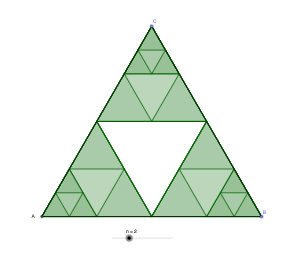
Loading the math board and drawing, please wait…
This example demonstrates the iterative construction of the classic fractal, the Sierpinski Triangle. Key mathematical concepts include fractal geometry, recursion, geometric transformations (rotation, midpoint), and self-similarity. The construction utilizes GeoGebra commands and objects such as Intersect, Point, Rotate, Angle, Midpoint, Polygon, and Segment as outlined in the summary. It is suitable for high school and above students to understand fractal concepts and geometric construction techniques.
GeoGebra Commands & Parameters
Intersect(xAxis, yAxis) → APoint(xAxis) → BRotate(B, 60°, A) → CAngle(B, A, C) → αMidpoint(C, A) → DMidpoint(C, B) → EMidpoint(B, A) → FPolygon(C, D, E) → t1, e, c, dPolygon(D, A, F) → t2, f, d_1, aPolygon(E, F, B) → t3, b, e_1, f_1Segment(C, A) → gSegment(A, B) → hSegment(B, C) → i
AI Drawing Prompt Reference
On the coordinate plane, first mark the intersection of the x- and y-axes as the base point, and choose a second point on one axis. Rotate this point by 60° around the base point to obtain a third point. At the base point, form the angle between the rays to the original axis point and to the rotated point, and keep the key connecting lines between these points. Next, take midpoints of the pairs formed by the rotated point with the base point, the rotated point with the other vertex, and also the base point with the other vertex. Use the resulting three midpoints together with their corresponding vertices to draw the three inner triangular polygons, forming the initial Sierpinski triangle iterative structure.
The prompt above was compiled from the original drawing commands and is for reference only.