
Shifted Inverse Square Root with Median Demonstration
Loading the math board and drawing, please wait…
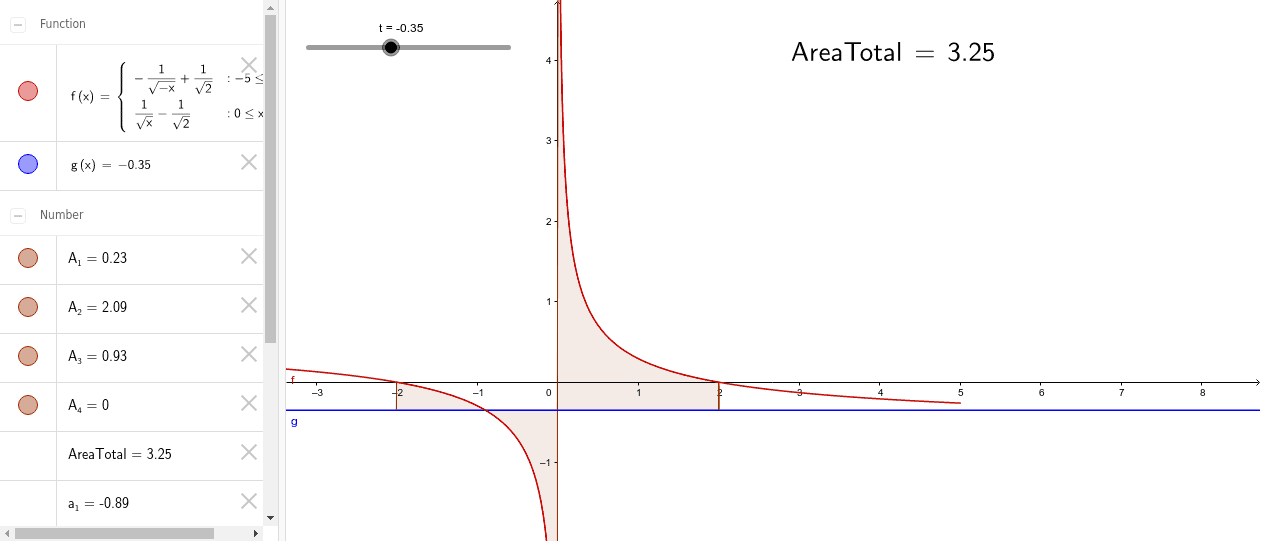
This example demonstrates the shifted inverse square root function and shows a unique median using an area function. Key math concepts include inverse square root function, similarity transformation, integral calculation, and median in probability & statistics. GeoGebra commands used are If, IntegralBetween, LaTeX, with objects like s, t, a_1, a_2, g, f, A_3, A_2, A_1, A_4, AreaTotal, and text1. Suitable for high school and above, focusing on function transformations, integral applications, and median calculations in probability.
GeoGebra Commands & Parameters
If(t ≤ 0, (-(1 / (t - s))^(2)), -2) → a_1If(t ≤ 0, 2, (1 / (t + s))^(2)) → a_2IntegralBetween(g, f, a_1, -1.0E-4) → A_3IntegralBetween(f, g, 1.0E-4, a_2) → A_2IntegralBetween(f, g, -2, a_1) → A_1IntegralBetween(g, f, a_2, 2) → A_4LaTeX(AreaTotal, true, true) → text1
AI Drawing Prompt Reference
Draw a coordinate plane showing a shifted inverse square root function and its symmetric counterpart. On the negative x-axis, the curve descends from the left toward zero, while on the positive side it rises from near zero, forming two roughly symmetric branches. Shade four integral regions: two narrow bands between the curve and the x-axis near zero, and two wider outer regions. Add a vertical dashed line at the center to indicate the median, and display a text label with the total area value. Emphasize the geometric relationship among function transformation, shaded areas, and the median.
The prompt above was compiled from the original drawing commands and is for reference only.