
Shape Fitting Puzzle
Loading the math board and drawing, please wait…
In collections
Surface Area
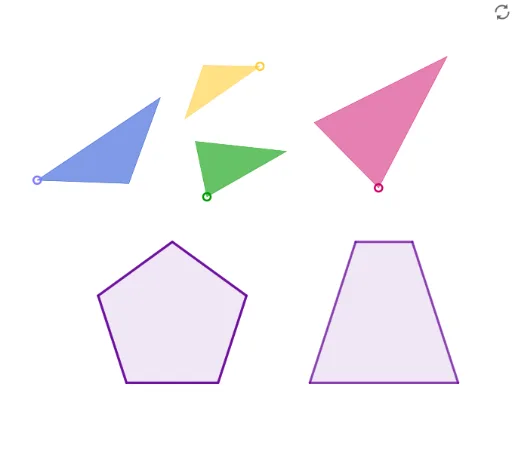
This is a puzzle to fit shapes with equivalent areas. The example involves concepts such as area, trapezoid, and tangent line. It is constructed using GeoGebra commands such as Intersect, Polygon, Point, Segment, Midpoint, LineBisector, Circle, Line, and OrthogonalLine. Suitable for middle school and above students or teachers.
GeoGebra Commands & Parameters
Intersect(xAxis, yAxis) → APolygon(A, B, 5) → poly1, f, g, h, i, j, C, D, EPoint(Circle[F, Distance[A, B]]) → GSegment(F, G) → kMidpoint(k) → HMidpoint(f) → ILineBisector(k) → lCircle(H, Distance[I, D]) → cIntersect(c, l, 2) → JPolygon(F, J, G) → t1, g_1, f_1, j_1Segment(D, B) → mLine(C, m) → nLine(D, xAxis) → pIntersect(n, p) → KMidpoint(h) → LPoint(Circle[M, Distance[D, C]]) → NSegment(M, N) → qMidpoint(q) → OOrthogonalLine(O, q) → rCircle(O, Distance[L, K]) → dIntersect(d, r, 2) → PPolygon(M, P, N) → t2, n_1, m_1, p_1Intersect(n, xAxis) → QPoint(Circle[R, Distance[B, Q]]) → SSegment(R, S) → sMidpoint(B, Q) → TMidpoint(s) → UOrthogonalLine(U, s) → tCircle(U, Distance[T, C]) → eIntersect(e, t) → V, WPolygon(R, W, S) → t3, s_1, r_1, wPoint(xAxis) → ZCircle(Z, Distance[A, Q]) → c_1Intersect(c_1, xAxis, 2) → A_1Line(A_1, n) → aSegment(D, A) → bLine(Z, b) → h_1Point(Circle[B_1, Distance[D, B]]) → C_1Segment(B_1, C_1) → i_1Midpoint(m) → D_1Segment(D_1, C) → k_1Midpoint(i_1) → E_1OrthogonalLine(E_1, i_1) → l_1Circle(E_1, k_1) → d_1Intersect(d_1, l_1, 2) → F_1Polygon(B_1, F_1, C_1) → t4, c_2, b_1, f_2Intersect(p, h_1) → G_1Intersect(p, a) → H_1Polygon(Z, G_1, H_1, A_1) → q1, z_1, g_2, h_2, a_1
AI Drawing Prompt Reference
Draw a shape composed of multiple trapezoids and triangles, with one large trapezoid and four smaller ones, each having the same area. Start by drawing the coordinate axes, then draw a large trapezoid in the first quadrant. Next, draw four smaller trapezoids inside the large one, ensuring each smaller trapezoid has the same area as the large one. Finally, connect the relevant points and segments to form the complete shape.
The prompt above was compiled from the original drawing commands and is for reference only.