
Sections of Triangular Prisms by S Sharma
Loading the math board and drawing, please wait…
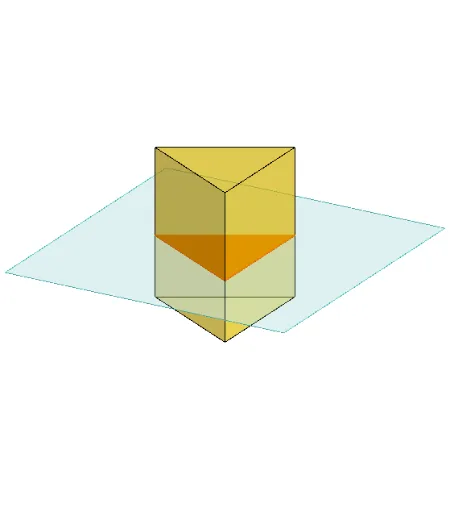
This example demonstrates different sections of a triangular prism. Key mathematical concepts include the properties of sections in solid geometry. Using GeoGebra commands such as Polygon, PointIn, Prism, etc., it dynamically shows the changes in sections. Suitable for middle school and above students to learn solid geometry.
GeoGebra Commands & Parameters
Polygon(B + (-2, -2), B + (2, -2), B + (2, 2), B + (-2, 2)) → poly3, e, f, g, iPointIn(poly3) → CTranslate((0, 0, 0), Vector[B, C]) → APolygon(A + (-4, -4), A + (4, -4), A + (4, 4), A + (-4, 4)) → poly1, a, b, c, dRotate(Rotate[Translate[poly1, Vector[A, A + (0, 0, h)]], (90° * s), A + (0, 0, h), yAxis], (90° * t), A, zAxis) → poly2Rotate(D, 120°, (0, 0, 0)) → EPolygon(D, E, 3, xOyPlane) → poly4, j, k, l, FPrism(poly4, D + (0, 0, 4)) → m, M, edge4, edge5, edge6, N, face1, face2, face3, face4, edge1, edge2, edge3PointIn(poly2) → GPointIn(poly2) → HPointIn(poly2) → IPlane(G, I, H) → nIntersectPath(n, m) → poly6, poly5, r, a_1, b_1, c_1, K, L_1, O, P, J, L, p, qRotate(m, 0, zAxis) → m'Rotate(m, 0, zAxis) → m'_1OrthogonalLine(A, n) → d_1
AI Drawing Prompt Reference
Draw a triangular prism to demonstrate its different sections. Start by creating a triangular base, then extend it upward to form the prism. Select a random point on one of the prism's lateral faces and use it to draw a parallel quadrilateral on the opposite face. Rotate this quadrilateral 90 degrees to form another lateral face, then rotate it 120 degrees to create a third face. Finally, draw an internal section of the prism where it intersects with a plane passing through the top face and part of the lateral faces.
The prompt above was compiled from the original drawing commands and is for reference only.