
Cube Nets Rotation
Loading the math board and drawing, please wait…
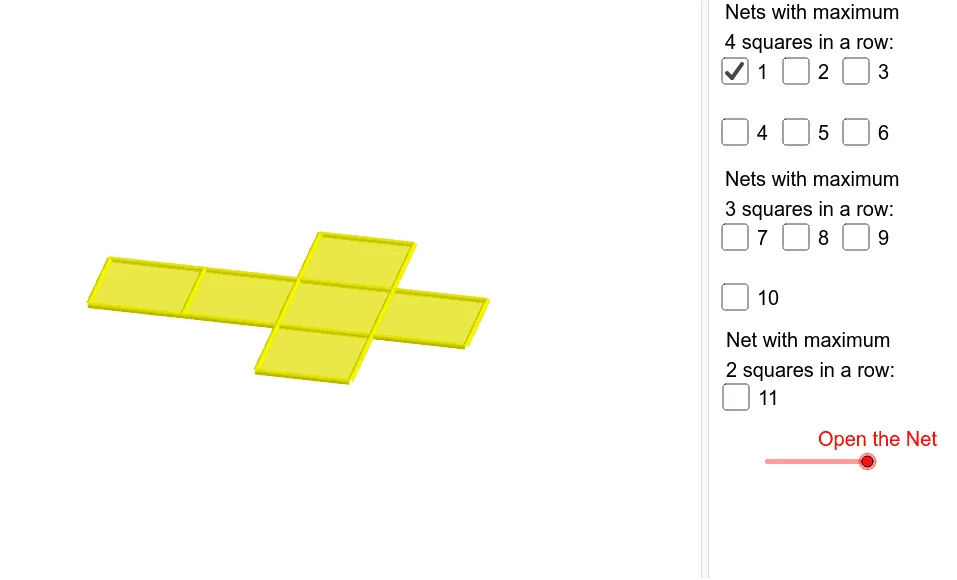
This example demonstrates the nets of a cube and their rotational transformations. It involves core math concepts like solid geometry, matrix transformations, and geometric constructions. GeoGebra commands used include Cube, Rotate, Midpoint, OrthogonalLine, Segment, and Translate. Suitable for high school mathematics teaching or beginners in geometry.
GeoGebra Commands & Parameters
Cube(A, B, xOyPlane) → a, C, faceBCGF, faceCDHG, faceEFGH, edgeAD, edgeAB, edgeBC, edgeCD, edgeAE, edgeDH, edgeEH, D, edgeEF, edgeBF, edgeFG, edgeCG, edgeGH, E, F, G, H, faceABCD, faceADHE, faceABFERotate(faceABFE, (90° * t), edgeAB) → faceABFE'Midpoint(A, C) → IOrthogonalLine(I, xOyPlane) → bRotate(faceABFE', 90*°, b) → faceABFE''Rotate(faceABFE', 180*°, b) → faceABFE''_1Rotate(faceABFE', 270*°, b) → faceABFE''_2Rotate(E, (90° * t), edgeAB) → E'Rotate(F, (90° * t), edgeAB) → F'Segment(E', F') → cRotate(Rotate[faceEFGH, (90° * t), edgeAB], (90° * t), Segment[E', F']) → poly1Translate(J, Vector[A, B]) → KTranslate(faceABFE''_1, Vector[A, J]) → poly2Translate(faceABCD, Vector[A, J]) → faceABCD'Translate(faceABFE', Vector[A, J]) → faceABFE''_3Translate(poly1, Vector[A, J]) → poly1'Translate(Rotate[Rotate[faceADHE, (90° * t), edgeAB], (((-90))° * t), Segment[Rotate[E, (90° * t), edgeAB], Rotate[A, (90° * t), edgeAB]]], Vector[A, J]) → poly4Translate(faceABFE'', Vector[A, J]) → faceABFE'''Translate(faceABCD, Vector[A, L]) → faceABCD'_1Translate(faceABFE''_1, Vector[A, L]) → poly3Translate(faceABFE', Vector[A, L]) → faceABFE''_4Translate(poly1, Vector[A, L]) → poly1'_1Translate(faceABFE'', Vector[A, L]) → faceABFE'''_1Midpoint(B, E') → MOrthogonalLine(M, faceABFE') → dTranslate(Rotate[faceABFE'', 180*°, d], Vector[A, L]) → poly5Translate(faceABCD, Vector[A, O]) → faceABCD'_2Translate(faceABFE''_1, Vector[A, O]) → poly6Translate(faceABFE', Vector[A, O]) → faceABFE''_5Translate(poly1, Vector[A, O]) → poly1'_2Translate(faceABFE'', Vector[A, O]) → faceABFE'''_2Translate(Rotate[Rotate[faceADHE, (90° * t), edgeCD], (90° * t), Segment[Rotate[H, (90° * t), edgeCD], Rotate[D, (90° * t), edgeCD]]], Vector[A, O]) → poly8Translate(faceABCD, Vector[A, N]) → faceABCD'_3Translate(faceABFE''_1, Vector[A, N]) → poly7Translate(faceABFE', Vector[A, N]) → faceABFE''_6Translate(poly1, Vector[A, N]) → poly1'_3Translate(Rotate[faceABFE'', 180*°, d], Vector[A, N]) → poly9Rotate(Rotate[H, (90° * t), edgeAB], (90° * t), Segment[E', F']) → PMidpoint(P, F') → QOrthogonalLine(Q, poly1) → eTranslate(Rotate[Rotate[faceABFE'', 180*°, d], 180*°, e], Vector[A, N]) → poly10Translate(faceABCD, Vector[A, R]) → faceABCD'_4Translate(faceABFE''_1, Vector[A, R]) → poly11Translate(faceABFE', Vector[A, R]) → faceABFE''_7Translate(poly1, Vector[A, R]) → poly1'_4Translate(Rotate[faceABFE'', 180*°, d], Vector[A, R]) → poly12Rotate(F', 180*°, b) → F''Midpoint(C, F'') → SOrthogonalLine(S, faceABFE''_1) → gTranslate(Rotate[Rotate[Rotate[faceADHE, (90° * t), edgeCD], (90° * t), Segment[Rotate[H, (90° * t), edgeCD], Rotate[D, (90° * t), edgeCD]]], 180*°, g], Vector[A, R]) → poly15Translate(faceABCD, Vector[A, T]) → faceABCD'_5Translate(faceABFE''_1, Vector[A, T]) → poly13Translate(faceABFE', Vector[A, T]) → faceABFE''_8Translate(Rotate[faceABFE', 270*°, b], Vector[A, T]) → poly14Translate(Rotate[poly1, -90*°, b], Vector[A, T]) → poly16Translate(Rotate[Rotate[Rotate[faceADHE, (90° * t), edgeAB], (((-90))° * t), Segment[Rotate[E, (90° * t), edgeAB], Rotate[A, (90° * t), edgeAB]]], 180*°, d], Vector[A, T]) → poly17Translate(faceABCD, Vector[A, U]) → faceABCD'_6Translate(faceABFE''_1, Vector[A, U]) → poly18Translate(faceABFE', Vector[A, U]) → faceABFE''_9Translate(Rotate[faceABFE', 270*°, b], Vector[A, U]) → poly19Translate(Rotate[Rotate[Rotate[faceADHE, (90° * t), edgeAB], (((-90))° * t), Segment[Rotate[E, (90° * t), edgeAB], Rotate[A, (90° * t), edgeAB]]], 180*°, d], Vector[A, U]) → poly20Translate(Rotate[faceABFE'', 270*°, d], Vector[A, U]) → poly22Translate(faceABCD, Vector[A, V]) → faceABCD'_7Translate(faceABFE''_1, Vector[A, V]) → poly21Translate(Rotate[faceABFE, (90° * t), edgeAB], Vector[A, V]) → poly23Translate(Rotate[Rotate[faceADHE, (90° * t), edgeCD], (90° * t), Segment[Rotate[H, (90° * t), edgeCD], Rotate[D, (90° * t), edgeCD]]], Vector[A, V]) → poly24Rotate(Rotate[faceADHE, (90° * t), edgeCD], (90° * t), Segment[Rotate[H, (90° * t), edgeCD], Rotate[D, (90° * t), edgeCD]]) → poly25Rotate(Rotate[E, (90° * t), edgeCD], (90° * t), Segment[Rotate[H, (90° * t), edgeCD], Rotate[D, (90° * t), edgeCD]]) → WMidpoint(D, W) → ZOrthogonalLine(Z, poly25) → hRotate(faceABFE''_1, 90*°, h) → poly26Translate(Rotate[faceABFE''_1, 90*°, h], Vector[A, V]) → poly27Rotate(C, 90*°, h) → C'Midpoint(W, C') → A_1OrthogonalLine(A_1, poly26) → iRotate(poly25, 180*°, i) → poly25'Translate(Rotate[poly25, 180*°, i], Vector[A, V]) → poly28Translate(faceABCD, Vector[A, B_1]) → faceABCD'_8Translate(faceABFE''_1, Vector[A, B_1]) → poly29Translate(faceABFE', Vector[A, B_1]) → faceABFE''_{10}Translate(Rotate[Rotate[Rotate[faceADHE, (90° * t), edgeAB], (((-90))° * t), Segment[Rotate[E, (90° * t), edgeAB], Rotate[A, (90° * t), edgeAB]]], 180*°, d], Vector[A, B_1]) → poly30Translate(Rotate[Rotate[faceADHE, (90° * t), edgeCD], (90° * t), Segment[Rotate[H, (90° * t), edgeCD], Rotate[D, (90° * t), edgeCD]]], Vector[A, B_1]) → poly31Translate(Rotate[faceABFE''_1, 90*°, h], Vector[A, B_1]) → poly32Translate(faceABCD, Vector[A, C_1]) → faceABCD'_9Translate(faceABFE''_1, Vector[A, C_1]) → poly33Translate(Rotate[Rotate[faceADHE, (90° * t), edgeCD], (90° * t), Segment[Rotate[H, (90° * t), edgeCD], Rotate[D, (90° * t), edgeCD]]], Vector[A, C_1]) → poly34Translate(Rotate[faceABFE''_1, 90*°, h], Vector[A, C_1]) → poly35Translate(faceABFE'', Vector[A, C_1]) → faceABFE'''_3Rotate(G, 90*°, b) → G'Rotate(F', 90*°, b) → F''_1Midpoint(B, F''_1) → D_1OrthogonalLine(D_1, faceABFE'') → jRotate(faceABCD, 90*°, j) → faceABCD'_{10}Translate(Rotate[faceABCD, 90*°, j], Vector[A, C_1]) → poly36
AI Drawing Prompt Reference
Draw a cube net and its rotational transformations around an edge by 90°, 180°, and 270°. Start by creating the net of a cube, then rotate the net around one of its edges to generate three new nets. Next, translate these rotated nets based on the center point of the original net to form multiple layers. Finally, add guide lines and points to illustrate the geometric relationships between rotations and translations.
The prompt above was compiled from the original drawing commands and is for reference only.