
Sections of Spheres by Dan Dale
Loading the math board and drawing, please wait…
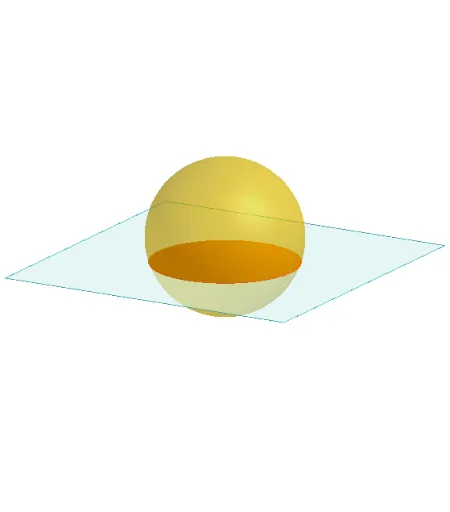
This example demonstrates the formation and variation of different sections of a sphere, involving core concepts like solid geometry, cross-sectional shapes, vectors, and coordinate geometry. It uses commands such as Polygon, PointIn, Translate, Rotate, Plane, OrthogonalLine, Sphere, and IntersectPath. Ideal for high school geometry instruction and exploratory learning.
GeoGebra Commands & Parameters
Polygon(B + (-2, -2), B + (2, -2), B + (2, 2), B + (-2, 2)) → poly3, e, f, g, iPointIn(poly3) → CTranslate((0, 0, 0), Vector[B, C]) → APolygon(A + (-4, -4), A + (4, -4), A + (4, 4), A + (-4, 4)) → poly1, a, b, c, dRotate(Rotate[Translate[poly1, Vector[A, A + (0, 0, h)]], (90° * s), A + (0, 0, h), yAxis], (90° * t), A, zAxis) → poly2PointIn(poly2) → GPointIn(poly2) → HPointIn(poly2) → IPlane(G, I, H) → nOrthogonalLine(A, n) → d_1Sphere((0, 0, 2), 2) → jIntersectPath(n, j) → k
AI Drawing Prompt Reference
Draw a sphere centered at the origin with a radius of 2. Then draw a rectangular section through the sphere's center and perpendicular to the z-axis. Rotate this rectangle 90 degrees around the z-axis to form a new section. On this new section, pick three points to define a plane. Finally, find the intersection path between this plane and the sphere.
The prompt above was compiled from the original drawing commands and is for reference only.