
Sections of Double Cone #2
Loading the math board and drawing, please wait…
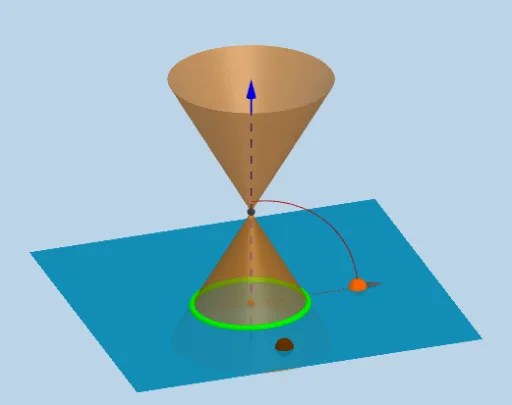
This interactive GeoGebra example dynamically explores the conic sections formed by intersecting a plane with a double cone, visually demonstrating how circles, ellipses, parabolas, and hyperbolas arise from a single geometric setup. Core mathematical concepts include the definition of conic sections, the geometry of plane-surface intersections, symmetry, and parametric curves. Construction highlights: the double cone is built using the InfiniteCone command, while OrthogonalLine, Plane, and Mirror create an adjustable cutting plane; IntersectPath computes the resulting section curve. Sliders (anim, j) drive the animation, and basic objects like Point, Line, Circle, and Intersect support the construction, with Textfield and Button enabling interactive input. Suitable for high school and early college students studying analytic and solid geometry, as well as for teachers demonstrating the unified nature of conic sections in the classroom.
GeoGebra Commands & Parameters
OrthogonalLine(M, xOyPlane) → aPoint(a) → BLine(A, yAxis) → gCircle(A, 16, xAxis) → cIntersect(g, c) → X_1, JIntersect(zAxis, c) → Z_1, Z_2CircleArc(A, X_1, Z_1) → fPoint(f) → CCIf(j < 0, A + (0, (16 * cos(0)), (16 * sin(0))), If[j < π / 2 - α - 0.01, A + (0, (16 * cos(j)), (16 * sin(j))), If[j < π / 2 - α + 0.1, A + (0, (16 * cos(π / 2 - α)), (16 * sin(π / 2 - α))), If[j < π / 2 + 0.1, A + (0, (16 * cos(j - 0.1)), (16 * sin(j - 0.1))), If[j > π / 2 + 0.1, A + (0, (16 * cos(π / 2)), (16 * sin(π / 2)))]]]]) → XXIf(anim, XX, CC) → CPoint(zAxis) → HIntersect(zAxis, xAxis) → OLine(C, A) → dLine(A, B) → bPlane(d, b) → eMirror(H, xOyPlane) → H'Point(zAxis) → IInfiniteCone(O, H, α) → mIntersectPath(e, m) → pVertex(p) → D, E, F, GAngle(C, A, Z_1) → βCircleArc(A, C, Z_1) → hCircle(A, 20, xAxis) → kRay(A, C) → iIntersect(i, k) → K,Vector(A, K) → lTextfield(α) → inputBox1
AI Drawing Prompt Reference
Draw a double cone with a plane intersecting it at an adjustable angle to form conic sections. The plane moves along a line parallel to the x-axis, and as the point on the x-axis changes, the shape of the intersection changes, showing circles, ellipses, parabolas, and hyperbolas. The double cone is centered at the origin, and the intersection curve is calculated by finding the points where the plane meets the cone. Add a slider to control the angle of the plane and display key points and auxiliary lines on the curve to observe the relationship between the section shape and the plane angle.
The prompt above was compiled from the original drawing commands and is for reference only.