
Sections of Double Cone # 1
Loading the math board and drawing, please wait…
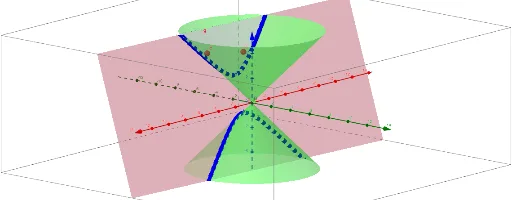
This example demonstrates various cross-sectional shapes formed by slicing a double cone with different planes, including ellipses and parabolas. It involves core mathematical concepts such as cones, linear functions, circumcircles, straight lines, slope differences, and combinatorics. The construction uses GeoGebra commands like Point, Intersect, Cone, PointIn, Plane, IntersectPath, and Corner. Suitable for high school and above students to explore the relationship between cone sections and analytical geometry, geometric constructions, and calculus.
GeoGebra Commands & Parameters
Point(zAxis) → AIntersect(xAxis, zAxis) → BCone(A, B, 6) → a, c, bPoint(zAxis) → CCone(C, B, 6) → d, e, fPointIn(c) → DPlane(D, E, F) → gIntersectPath(g, a) → hCorner(h) → G, HIntersectPath(g, d) → kCorner(k) → I, J
AI Drawing Prompt Reference
Draw a double cone and slice it with different planes to show cross-sectional shapes like ellipses and parabolas. First, create two cones with vertices on the z-axis and bases intersecting at the origin. Then, select a point on one cone, draw a plane through this point, and intersect it with both cones to get the elliptical and parabolic sections. Finally, highlight the intersection points and draw the curves of the sections.
The prompt above was compiled from the original drawing commands and is for reference only.