
Cone and Single Plane Intersection
Loading the math board and drawing, please wait…
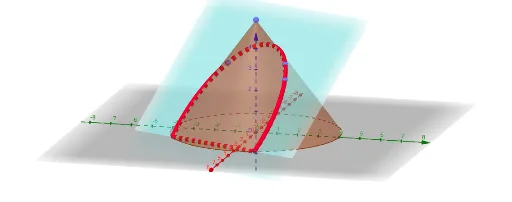
① This example demonstrates the intersection curve between a cone and a single plane in 3D space, typically producing conic sections such as an ellipse, parabola, or hyperbola, and visualizes the resulting curve's position. ② Core mathematical concepts include solid geometry (cone surface), intersection of a plane and a curved surface, classification of conic sections (quadratic curves), and representation of 3D vectors, points, and planes. ③ Construction details: Based on the construction summary, GeoGebra commands such as Intersect, Point, Cone, PointIn, Plane, IntersectPath, and Corner are used, along with multiple points (A, B, C, D, E, etc.) and objects (a, b, c, d, e, etc.) to define the cone, plane, and intersection path. ④ Suitable for high school or early college students learning solid geometry and analytic geometry, and for teachers to demonstrate the dynamic generation of conic sections by cutting a cone with a plane, helping students understand the geometric nature of conic sections.
GeoGebra Commands & Parameters
Intersect(zAxis, xOyPlane) → APoint(zAxis) → BCone(A, B, 4) → a, c, bPointIn(b) → CPointIn(b) → DPointIn(b) → EPlane(C, D, E) → dIntersectPath(d, a) → eCorner(e) → F, G, H, I
AI Drawing Prompt Reference
Draw the intersection curve between a cone and a plane. Start by creating point A at the intersection of the z-axis and the xOy plane, then draw cone a, b, c with A as the apex and B as the base, height 4. Select three points C, D, and E on cone b, then draw plane d with C, D, and E as vertices. Find the intersection path e between plane d and cone a, and identify the four corner points F, G, H, and I of the intersection path.
The prompt above was compiled from the original drawing commands and is for reference only.