
Plane Intersects a Cone: Exploring Conic Sections
Loading the math board and drawing, please wait…
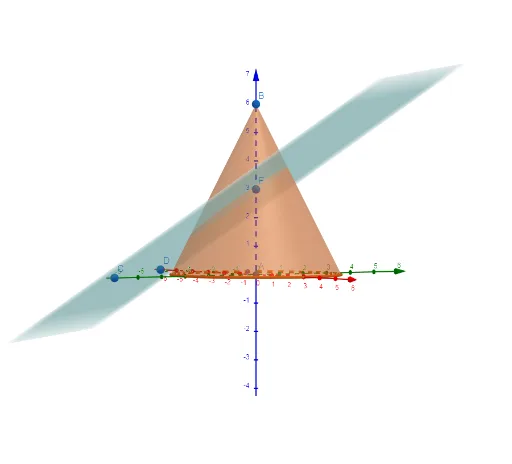
This GeoGebra example demonstrates the intersection of a plane with a cone, revealing the classic conic sections (circle, ellipse, parabola, hyperbola) as the plane's orientation changes. It visualizes how a single geometric construction can produce all four types of curves, linking 3D solid geometry with 2D analytic geometry. Core concepts include the cone equation, plane equation, intersection curve, and classification of conics. The construction uses GeoGebra commands: Cone to create the cone, Plane to define the cutting plane, Intersect to compute the intersection curve, and Point to mark key points (A, B, C, D, E) that control the plane's position. Suitable for high school or early college students studying solid geometry, analytic geometry, or precalculus, this interactive model helps learners grasp the unified nature of conic sections and the role of plane inclination in determining the curve type.
GeoGebra Commands & Parameters
Intersect(yAxis, zAxis) → APoint(zAxis) → BCone(A, B, 3) → a, c, bPoint(yAxis) → CPoint(xAxis) → DPoint(zAxis) → EPlane(C, D, E) → p
AI Drawing Prompt Reference
Visualize a 3D geometric scene with a cone and a plane intersecting it, showing how the intersection curve transforms into a circle, ellipse, parabola, or hyperbola as the plane's orientation changes. Include the cone, the plane, and the intersection curve, where the plane passes through the cone's vertex and rotates around an axis, altering the curve's shape based on the plane's inclination.
The prompt above was compiled from the original drawing commands and is for reference only.