
Scatter Plots and Fitted Functions
Loading the math board and drawing, please wait…
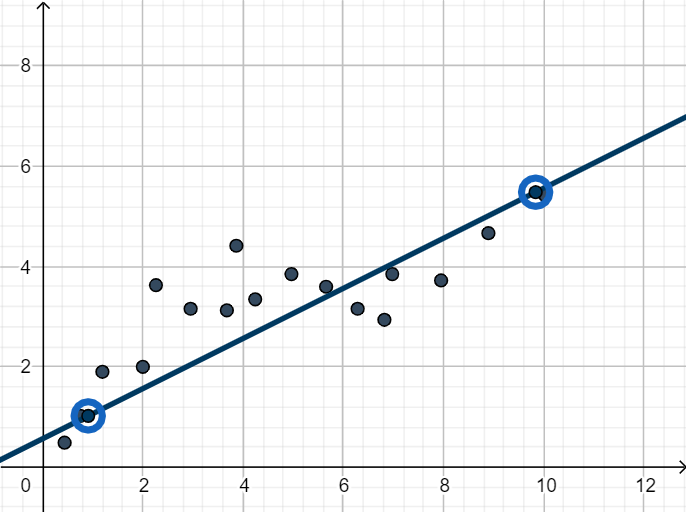
This example demonstrates how to visualize data points through scatter plots and generate linear, polynomial, exponential, and logarithmic functions using GeoGebra's fitting tools. Key math concepts include probability & statistics, function fitting, least squares method, and geometric transformations. Construction highlights the use of commands like Line, If, FitPoly, FitExp, FitLog, RSquare, Corner, and objects such as LinFit, QuadFit, ExpFit. Ideal for high school and above, focusing on data visualization, model selection, and evaluation.
GeoGebra Commands & Parameters
Line(F, D) → LinFitIf(Linear ≟ true ∨ Quad ≟ true ∨ Cubic ≟ true ∨ Exp ≟ true ∨ Logarithmic ≟ true, 1, 0) → kFitPoly({D, G, F}, 2) → QuadFitFitExp({D, F}) → ExpFitFitPoly({A, D, G, F}, 3) → CubicFitFitLog({D, F}) → LogFitRSquare({E1, E2, E3, E4, E5, E6, E7, E8, E9, E10, E11, E12, E13, E14, E15, E16, E17}, LinFit) → LinR2RSquare({E1, E2, E3, E4, E5, E6, E7, E8, E9, E10, E11, E12, E13, E14, E15, E16, E17}, QuadFit(x)) → QuadR2RSquare({E1, E2, E3, E4, E5, E6, E7, E8, E9, E10, E11, E12, E13, E14, E15, E16, E17}, CubicFit(x)) → CubR2RSquare({E1, E2, E3, E4, E5, E6, E7, E8, E9, E10, E11, E12, E13, E14, E15, E16, E17}, ExpFit(x)) → ExpR2RSquare({E1, E2, E3, E4, E5, E6, E7, E8, E9, E10, E11, E12, E13, E14, E15, E16, E17}, LogFit(x)) → LogR2Corner(text3, 1) → fc1Corner(text3, 3) → fc3Corner(text3, 4) → fc4Corner(text3, 2) → fc2
AI Drawing Prompt Reference
In a single coordinate plane, plot a scatter set of discrete data points that will be used for fitting. Then construct five fitted curves over the same domain: a linear best-fit line, a quadratic polynomial fit, a cubic polynomial fit, an exponential fit, and a logarithmic fit. Ensure each curve is tied to its corresponding fitted function derived from the same data points. Compute a goodness-of-fit score for each model and display these values alongside the curves. Finally, place four corner label callouts at distinct corner-like positions to annotate the figure.
The prompt above was compiled from the original drawing commands and is for reference only.