
Linear vs. Nonlinear Relationships in Scatter Plots
Loading the math board and drawing, please wait…
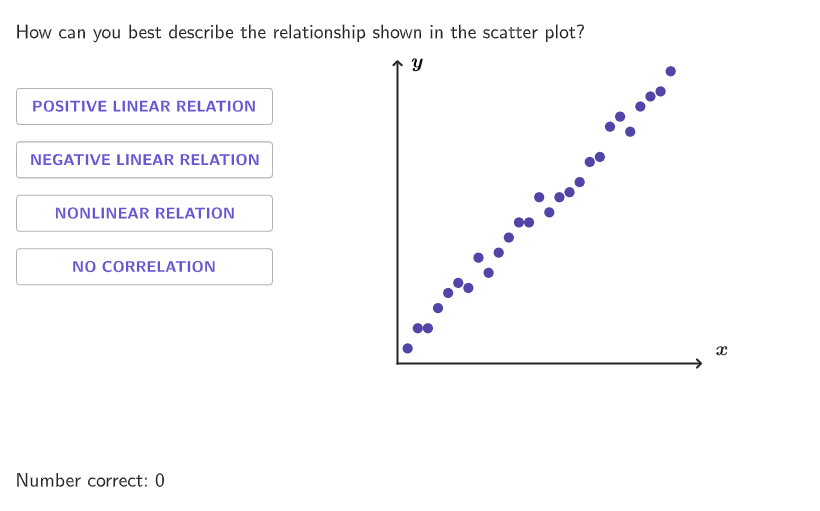
This example demonstrates linear and nonlinear relationships in scatter plots to help students identify trends in data sets. Commands used include Shuffle, Element, If, Point, Append, Slope, Text, Translate, etc. Suitable for 6-8 grade students to practice identifying linear and nonlinear relationships.
GeoGebra Commands & Parameters
Shuffle(Sequence[0, 1.25, 0.25]) → randomb, {0, 1.25, 0.5, 0.25, 0.75, 1}Shuffle(Flatten[Sequence[{1, 2, 3, 4}, ii, 1, 5]]) → randomList1, {1, 4, 3, 4, 1, 4, 4, 1, 3, 2, 2, 2, 2, 1, 4, 3, 3, 3, 2, 1}Element(randomList1, Mod[countQuestion, Length[randomList1]] + 1) → randomNum1Shuffle(Sequence[4] \ {randomNum1}) → RanPositionsOrder, {3, 2, 4}Shuffle(Sequence[0, 3, 0.1] \ {Element[Sequence[0, 3, 0.1], Mod[countQuestion, 5] + 1]}) → randomList2, {2.4000000000000004, 1.8000000000000007, 2.1, 0.5, 0.8999999999999999, 2, 0.7, 2.3000000000000003, 1, 0.7999999999999999, 0.1, 1.2000000000000002, 1.7000000000000006, 1.1, 1.4000000000000004, 1.6000000000000005, 1.5000000000000004, 2.5000000000000004, 1.3000000000000003, 0.4, 2.6000000000000005, 2.7000000000000006, 1.9000000000000008, 2.2, 2.8000000000000007, 3, 0.2, 0.6, 2.900000000000001, 0.30000000000000004}Shuffle(Sequence[2, 4]) → randomn, {4, 3, 2}Shuffle(Sequence[0.5, 3, 0.25]) → randomm, {0.5, 1.75, 2, 1, 1.5, 2.25, 0.75, 2.75, 1.25, 2.5, 3}Shuffle(Flatten[Sequence[Sequence[0, 0.25, 0.05], ii, 1, 5]]) → randomErrors, {0.15000000000000002, 0, 0.25, 0.2, 0, 0.05, 0.05, 0, 0.1, 0.25, 0.05, 0.2, 0, 0.15000000000000002, 0.25, 0.05, 0, 0.15000000000000002, 0.1, 0.15000000000000002, 0.1, 0.2, 0.1, 0.25, 0.2, 0.25, 0.15000000000000002, 0.2, 0.1, 0.05}If(randomNum1 ≠ 1, 3 - Element[randomb, Mod[countQuestion, Length[randomb]] + 1], Element[randomb, Mod[countQuestion, Length[randomb]] + 1]) → interceptPoint(yAxis) → FAppend(randomNum1, RanPositionsOrder) → RanPosOrderCompletElement(randomn, Mod[countQuestion, 3] + 1) → coeffnSlope(Line[G, H]) → slopeText((((intercept * "-") * slope) * "x")) → expressionQ11Text((((intercept * "+") * slope) * "y")) → expressionQ1Translate(Polygon[{F, F - (0, hei), F + (wid, (-hei)), F + (wid, 0)}], (0, -0.07)) → dropareaTableText(Append[Flatten[Sequence[{"\hspace{-10}y", "\hspace{-10}\times"}, i, 1, coeffn - 1]], "\hspace{-10}y"]) → tableQ9Element(randomList2, Mod[countQuestion, 15] + 1) → randomNum2Textfield(input1) → InputBox1Textfield(input2) → InputBox2Corner(5) → layoutAppSizeonboardingTextOffset(Corner[onboardingText, 1], Corner[onboardingText, 3], onboardingCase, Corner[1], Corner[3], Corner[5]) → OnboardingTextOffsetSequence((3 + ini, 1.35 + (ii * 0.55) - hei), ii, 0, 3) → l2Sort(l2, RanPosOrderComplet) → PositionsOrderVertex(droparea, 2) → PZip((("\textsf{" * TT) * "}"), TT, {"POSITIVE LINEAR RELATION", "NEGATIVE LINEAR RELATION", "NONLINEAR RELATION", "NO CORRELATION"}) → OptionsSegment((0, 0), (3, 0)) → fakexAxisSegment((0, 0), (0, 3)) → fakeyAxisTranslate(vGL, Vector[(Vector[Corner[1], Corner[2]] / 800 * 32)]) → vGL'KeepIf(0.1 ≤ y(PP) ≤ 2.9, PP, Zip[(ii, (slope * ii) + intercept + ee), ii, randomList2, ee, randomErrors]) → linCoScatterKeepIf(0.1 ≤ y(PP) ≤ 2.9, PP, Zip[(ii, f1(ii) + ee), ii, randomList2, ee, randomErrors]) → nonlinScatterText("\bold{x}", (3.2, -0.07), true, true, 0, 1) → labelxText("\bold{y}", (0.2, 3), true, true, 0, 0) → labelyFitLineY(linCoScatter) → flinPolygon({(0.05, 0.05), (2.95, 0.05), (2.95, 2.95), (0.05, 2.95)}) → q1KeepIf(0.1 ≤ y(PP) ≤ 2.9, PP, Zip[(ii, (1.5 * sin((1000 * ii))) + 1.5 + ee), ii, randomList2, ee, randomErrors]) → noCorScatter2Mirror(noCorScatter2, y = 1.5) → noCorScatterFitSin(nonlinScatter) → fitsinFitPoly(nonlinScatter, If[nonLinop ≤ 2, 2, 3]) → fitquadText(Element[Options, 4], (0, 0), true, true) → text4Text(Element[Options, 3], (0, 0), true, true) → text3Text(Element[Options, 2], (0, 0), true, true) → text2Text(Element[Options, 1], (0, 0), true, true) → text1Translate(p, Vector[(Vector[Corner[4], Corner[1]] / 500 * 16)]) → p'
AI Drawing Prompt Reference
Draw a coordinate-plane activity that compares scatter plots of different relationships. First show a linear positive or negative trend using one set of points scattered around a straight-line fit, with noticeable noise so the points are not perfectly aligned. Then add a clearly nonlinear scatter set in the same bounded window (roughly x,y from about 0.1 to 2.9), following a curved pattern with a smooth fitted curve (e.g., sinusoidal or quadratic). Include visible x- and y-axis labels. Add option text in a corner indicating four categories: POSITIVE LINEAR RELATION, NEGATIVE LINEAR RELATION, NONLINEAR RELATION, NO CORRELATION, so the viewer can classify each scatter plot by visual trend.
The prompt above was compiled from the original drawing commands and is for reference only.