
Scalar Product: Algebraic Measure vs Dot Product
Loading the math board and drawing, please wait…
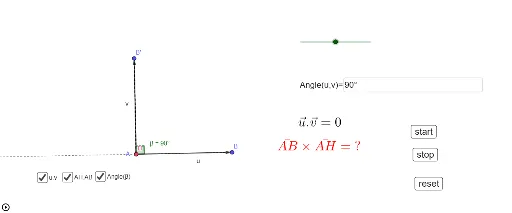
① This interactive GeoGebra example visually contrasts the algebraic measure (signed projection length) of a vector with its dot product (scalar product), clarifying the geometric and algebraic interpretations. ② Core mathematical concepts include the dot product, vector projection, the cosine of the angle between vectors, and the notion of signed length along a direction. ③ Construction highlights: using GeoGebra commands such as Vector, Rotate, Angle, OrthogonalLine, Intersect, Segment, Ray, and Textfield, the example builds vectors u and v, constructs the angle β, projects one vector onto the other, and provides interactive input boxes and buttons to dynamically alter parameters and observe changes in the scalar product. ④ Suitable for high school to early university students, particularly in analytic geometry, introductory linear algebra, or pre-calculus courses; also valuable for teachers demonstrating vector operations and for students exploring geometric intuition behind algebraic formulas.
GeoGebra Commands & Parameters
Vector(A, B) → uRotate(B, a, A) → B'Angle(B, A, B') → βVector(A, B') → vOrthogonalLine(B', u, xOyPlane) → fLine(A, B) → gIntersect(f, g) → HSegment(B', H) → hAngle(B, H, B', xOyPlane) → γSegment(A, H) → iSegment(A, B) → jRay(B, A) → kTextfield(a) → InputBox1
AI Drawing Prompt Reference
Draw a 2D coordinate system with two vectors sharing a common starting point. One vector is fixed, and the other can rotate around the start. Show the angle between them. Project the rotating vector orthogonally onto the line of the fixed vector, marking the foot of the perpendicular. Connect the foot to the tip of the rotating vector with a segment, and indicate the right angle at the foot. Also draw a segment from the start to the foot along the fixed line to represent the signed projection length. Include an input box to adjust the rotation angle, updating the figure dynamically.
The prompt above was compiled from the original drawing commands and is for reference only.