
SAS Triangle Congruence Exercise
Loading the math board and drawing, please wait…
In collections
Congruence (CO) Cluster
CCSS High School: Geometry (Congruence) Volume 1
CCSS High School: Geometry (Congruence) Volume 1
CCSS High School: Geometry (Congruence) Volume 1
Unit 5: Triangle Congruence
Triangle Congruence Theorems 1
Triangle Congruence Book 1
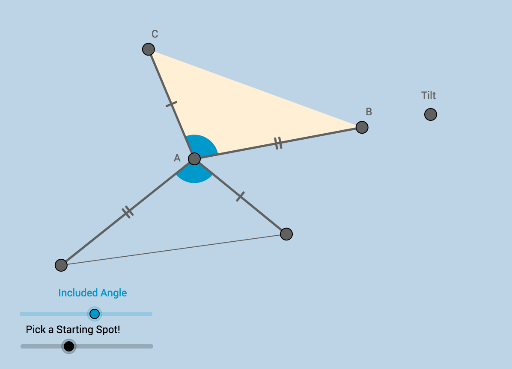
This example demonstrates how to prove triangle congruence using the SAS (Side-Angle-Side) criterion. It involves core mathematical concepts such as triangle congruence, angle measurement, and side length measurement. Key GeoGebra commands and objects used include Ray, Rotate, Angle, Point, Polygon, Segment, Circle, Intersect, CircleSector, Vector, and Translate. It is suitable for high school students learning geometric proof methods.
GeoGebra Commands & Parameters
Ray(A, W) → fRotate(W, α, A) → B'Angle(W, A, B') → βPoint(f) → BRay(A, B') → gPoint(g) → CPolygon(A, B, C) → poly1, h, i, jSegment(A, C) → kSegment(A, B) → lCircle(A, (0.2 * Min[k, l])) → h_5Intersect(h_5, f) → F,Intersect(h_5, k) → G,CircleSector(A, F, G) → dPoint(xAxis) → HVector((a, b)) → uTranslate(A, u) → A'Translate(C, u) → C'Segment(A', C') → k'Translate(A, u) → R_1Circle(R_1, Radius[h_5]) → eRotate(A, γ, A) → R_2Rotate(B, γ, A) → K_1Rotate(C, γ, A) → KPolygon(R_2, K_1, K) → poly1'_1, c'_1, a'_2, b'_1Rotate(d, γ, A) → d'Segment(A, K_1) → mSegment(A, K) → nSegment(K_1, K) → p
AI Drawing Prompt Reference
Draw a triangle to demonstrate triangle congruence using the SAS criterion. Start by drawing a ray, then rotate it around a point by a certain angle to create a second ray. Measure the angle between the rays. Take a point on the second ray and connect it to the endpoint of the first ray to form a triangle. Draw a circle centered on the first ray with a radius equal to the shorter side, intersecting the ray at two points. Connect these points to the endpoint of the first ray to form a sector. Translate the triangle along a vector to create a new triangle, and draw the corresponding sides. Finally, rotate the sector and the triangle to show congruence.
The prompt above was compiled from the original drawing commands and is for reference only.