
S-S-A Law of Sines Illustrator
Loading the math board and drawing, please wait…
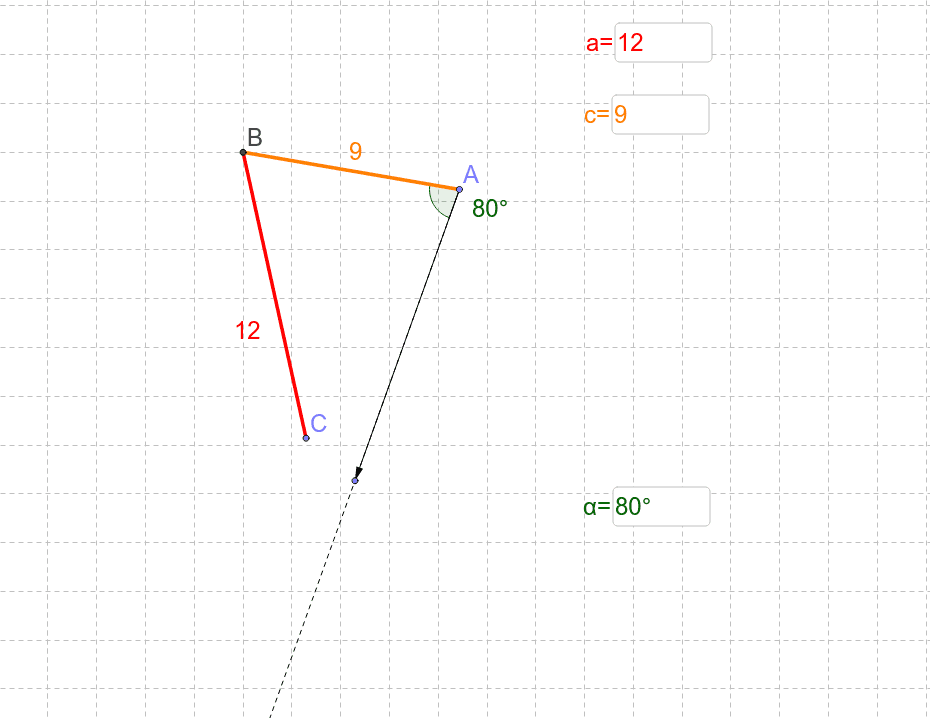
This GeoGebra applet illustrates the potential outcomes of the Law of Sines when given two sides and a non-included angle. It covers core trigonometry concepts and uses commands like Intersect, Point, Segment, Textfield, Rotate, Angle, Ray, and Vector to construct the demonstration. Suitable for high school mathematics education and learning.
GeoGebra Commands & Parameters
Intersect(xAxis, yAxis) → BPoint(Circle[B, abs(a)]) → CSegment(B, C) → bPoint(Circle[B, abs(c)]) → ASegment(B, A) → dTextfield(a) → inputBox1Textfield(c) → inputBox2Rotate(B, α, A) → B'Angle(B, A, B') → βRay(A, B') → ePoint(e) → DVector(A, D) → uTextfield(α) → inputBox4
AI Drawing Prompt Reference
Draw a triangle ABC where the length of side a and c are given, along with the angle α opposite to side c. Start by drawing the intersection point B of the x-axis and y-axis. Then, draw a circle with center B and radius a to get point C. Connect B and C to form side b. Next, draw a circle with center B and radius c to get point A. Connect B and A to form side d. Input the lengths of sides a and c, and the degree of angle α. Then, rotate point B around point A by angle α to get B', and connect A and B' to form angle β. Draw a ray e starting from A in the direction of B', and find point D where ray e intersects with ray e. Connect A and D to form vector u.
The prompt above was compiled from the original drawing commands and is for reference only.