
Trig in the Unit Circle: Reference Angles and Symmetry
Loading the math board and drawing, please wait…
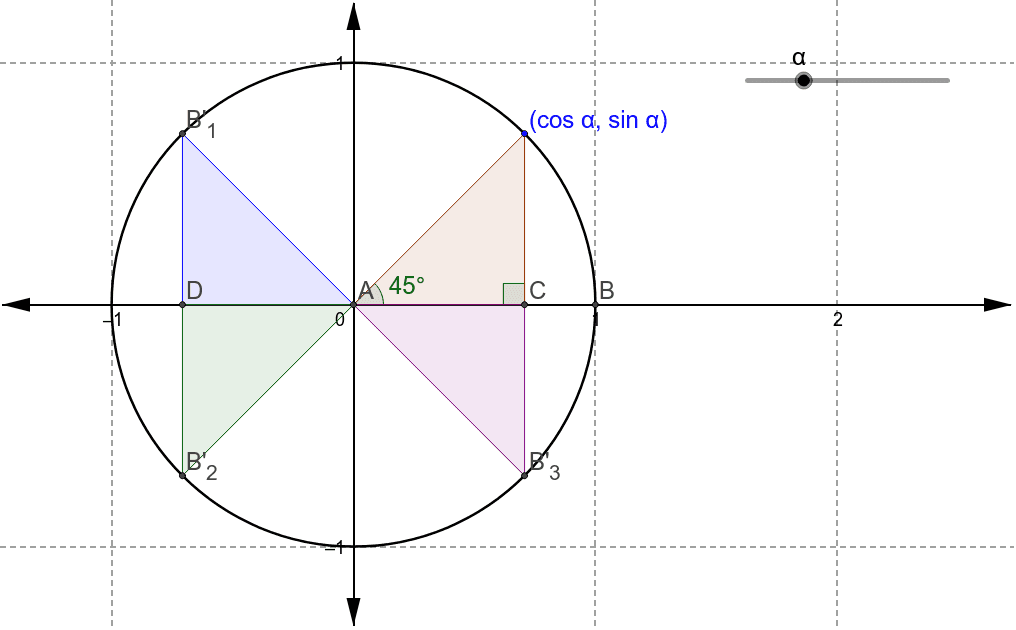
This GeoGebra example demonstrates trigonometric ratios on the unit circle, focusing on reference angles and symmetry across quadrants. Key concepts include sine, cosine, tangent definitions, and rotational symmetry. Construction utilizes commands like Intersect, Circle, Rotate, Angle, Polygon, and Segment to create an interactive model. Ideal for high school students and educators exploring trigonometric identities and unit circle properties dynamically.
GeoGebra Commands & Parameters
Intersect(xAxis, yAxis) → ACircle(A, 1) → cIntersect(c, xAxis, 2) → BRotate(B, α, A) → B'Angle(B, A, B') → βIntersect(a, xAxis) → CPolygon(A, C, B') → poly1, b', a_1, c_1Angle(B', C, A) → γRotate(B, π - α, A) → B'_1Angle(B, A, B'_1) → δRotate(B, π + α, A) → B'_2Angle(B, A, B'_2) → εRotate(B, (2 * π) - α, A) → B'_3Angle(B, A, B'_3) → ζSegment(B'_1, B'_2) → dIntersect(d, xAxis) → DPolygon(B'_1, D, A) → poly2, a_2, b'_1, d_1Polygon(D, B'_2, A) → poly3, a_3, d_2, b'_2Polygon(A, C, B'_3) → poly4, b'_3, a_4, c_2
AI Drawing Prompt Reference
Draw a unit circle to illustrate trigonometric functions, including sine, cosine, and tangent definitions. Start by marking the intersection of the x-axis and y-axis as point A, then draw a unit circle c centered at A. Find the intersection of c with the x-axis as point B, rotate B around A to get B', and calculate the angle β between B and B'. Next, find another intersection of c with the x-axis as point C, and connect A, C, and B' to form a polygon. Calculate the angle γ between B', C, and A, then rotate B around A to get B'_1, B'_2, and B'_3, and calculate the angles δ, ε, and ζ between B, A, and B'_1, B'_2, B'_3. Finally, connect B'_1 and B'_2 to form line segment d, find the intersection D of d with the x-axis, and connect B'_1, D, A, D, B'_2, A, D, B'_3, and A to form four polygons.
The prompt above was compiled from the original drawing commands and is for reference only.