
Russian Multiplication Demo
Loading the math board and drawing, please wait…
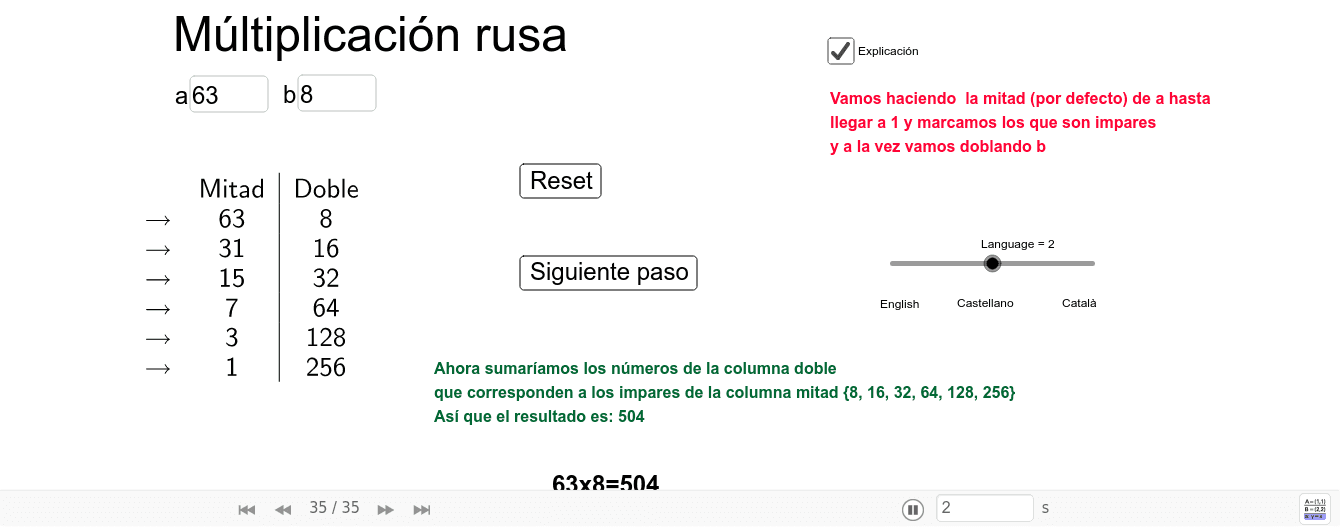
This example demonstrates the Russian multiplication algorithm, illustrating its process and principles through graphical means. Core math concepts include multiplication, sequences, binary representation, and algorithmic efficiency. Construction highlights involve GeoGebra commands like Textfield, Append, Sequence, RemoveUndefined, Sum, TableText, and objects such as a, b, npasos, meitats, dobles, lista1, etc., for input, computation, and output modules. Suitable for middle school students and above to learn algorithmic thinking or as an introductory case for mathematical modeling.
GeoGebra Commands & Parameters
Textfield(a) → CasillaDeEntrada1Textfield(b) → CasillaDeEntrada2Append(a, Sequence[Div[a, 2^(k)], k, 1, npasos]) → meitatsAppend(b, Sequence[(b * 2^(k)), k, 1, npasos]) → doblesSequence(If[Mod[Element[meitats, k], 2] ≟ 0, " ", texto1], k, 1, npasos + 1) → imparellsSequence(If[Mod[Element[meitats, k], 2] ≠ 0, Element[dobles, k]], k, 1, npasos + 1) → lista1RemoveUndefined(lista1) → AsumarAppend(Asumar, Sum[Asumar]) → lista2Sequence(Element[meitats, k], k, 1, n) → pmeitatsSequence(Element[dobles, k], k, 1, n) → pdoblesSequence(Element[imparells, k], k, 1, n) → pimparellsSum(Asumar) → sumaTableText({Append[" ", pimparells], Append["Mitad", pmeitats], Append["Doble", pdobles]}, "vc|0010") → texto9TableText({Append[" ", pimparells], Append["Half", pmeitats], Append["Double", pdobles]}, "vc|0010") → texto10TableText({Append[" ", pimparells], Append["Meitat", pmeitats], Append["Doble", pdobles]}, "vc|0010") → taula
AI Drawing Prompt Reference
Create a table illustrating the Russian multiplication algorithm. On the left, show a sequence of numbers obtained by repeatedly halving the first input; on the right, show the corresponding sequence of doubling the second input. Mark each left-side entry as even (blank) or odd (checkmark), and keep only the right-side entries aligned with odd left entries. Below the table, display the sum of all kept right-side entries. The table has three rows: marks, halves, and doubles, with clear column separators.
The prompt above was compiled from the original drawing commands and is for reference only.