
Rounding to the nearest 10 or 100
Loading the math board and drawing, please wait…
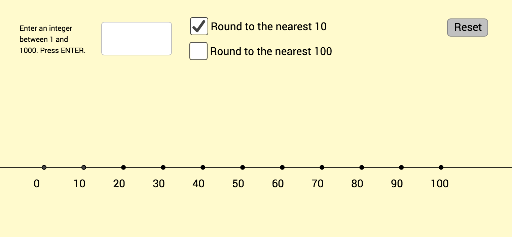
This example demonstrates how to use GeoGebra to round numbers to the nearest 10 or 100. Key math concepts include numerical approximation and rounding rules. Construction highlights the use of commands/objects like Line, Textfield, If, Text, Translate, Sequence. Suitable for middle school mathematics education to help students understand the concept and operation of numerical approximation.
GeoGebra Commands & Parameters
Line(A, K) → fTextfield(inputtext) → InputBox1If(roundHundreds ≟ true, Sequence[Text[(10 * i), Element[list1, i / 10 + 1] + (adjusthorizontal, adjustvertical)], i, 0, 100, 10], Sequence[Text[(100 * inputHundreds) + i, Element[list1, i / 10 + 1] + (adjusthorizontal, adjustvertical)], i, 0, 100, 10]) → LabelsOriginalText(inputnumber, PointToLocate + (adjusthorizontal, adjustvertical + 0.75)) → text1If(roundHundreds ≟ true, (inputnumber / 100, y(A)), ((inputnumber - (100 * inputHundreds)) / 10, y(A))) → PointDestinationIf(roundTens ≟ true, {inputnumber - inputOnes, inputnumber - inputOnes + 10}, {(100 * inputHundreds), (100 * inputHundreds) + 100}) → NewBounds1If(roundTens ≟ true, {Element[list1, inputTens + 1], Element[list1, inputTens + 2]}, {Element[list1, inputHundreds + 1], Element[list1, inputHundreds + 2]}) → list4Translate(MinPoint, Vector[(slideit * Vector[Element[list4, 1], A])]) → MinPoint'Translate(MaxPoint, Vector[(slideit * Vector[Element[list4, 2], K])]) → MaxPoint'If(roundTens ≟ true, Sequence[Text[Element[NewBounds1, 1] + i, Element[list1, i + 1] + (adjusthorizontal, adjustvertical)], i, 0, 10], Sequence[Text[Element[NewBounds1, 1] + (10 * i), Element[list1, i + 1] + (adjusthorizontal, adjustvertical)], i, 0, 10]) → LabelsNewIf(roundTens ≟ true, (x(A) + inputOnes, y(A)), (x(A) + ((10 * inputTens) + inputOnes) / 10, y(A))) → PointDestinationNewTranslate(L, Vector[PointDestination, PointDestinationNew]) → L'Translate(PointToLocate, Vector[(slideit1 * Vector[PointToLocate, PointDestination])]) → PointToLocate'Translate(PointToLocate', Vector[(slideit * Vector[PointToLocate', L'])]) → PointToLocate''Sequence((x(A) + i, y(A)), i, 0, 10) → list2Text(Element[NewBounds1, 1], MinPoint' + (adjusthorizontal, adjustvertical)) → boundlowerText(Element[NewBounds1, 2], MaxPoint' + (adjusthorizontal, adjustvertical)) → boundupperText(inputnumber, PointToLocate' + (adjusthorizontal, adjustvertical + 0.75)) → text4Text(inputnumber, PointToLocate'' + (adjusthorizontal, adjustvertical + 0.75)) → text5If(inputnumber - Element[NewBounds1, 1] < Element[NewBounds1, 2] - inputnumber, Element[NewBounds1, 1], Element[NewBounds1, 2]) → roundwinnerIf(inputnumber - Element[NewBounds1, 1] > Element[NewBounds1, 2] - inputnumber, Element[NewBounds1, 1], Element[NewBounds1, 2]) → roundloser
AI Drawing Prompt Reference
Draw a number line from 0 to 100, marking points every 10 or 100 units. Users can input a number and find and mark the two closest points on the number line based on their chosen rounding method (to 10 or 100). The number line should also display the input number and the values of the two closest points.
The prompt above was compiled from the original drawing commands and is for reference only.