
Fractions on a Number Line
Loading the math board and drawing, please wait…
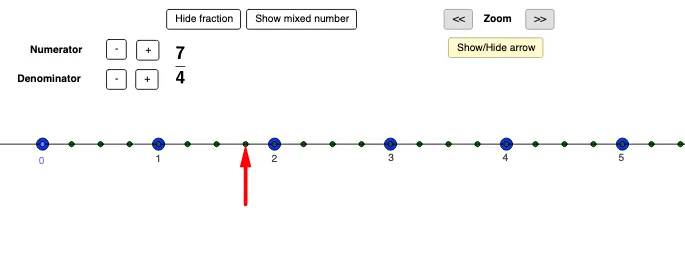
This example demonstrates how fractions can be represented on a number line using geometric constructions. Key mathematical concepts include fractions, similar triangles, and geometric construction. The construction involves using GeoGebra commands such as Point, Sequence, Vector, and others to create fraction points on the number line. Adjusting the scale and units helps verify fraction representations. Suitable for middle school students learning geometry and fractions, or for math teaching demonstrations.
GeoGebra Commands & Parameters
Point(a) → ASequence((x(A) + (i * denomsize), y(A)), i, 1, totaldots) → list2Sequence((x(A) + (i * unitsize), y(A)), i, 0, numberofwholes) → list1Vector(C, B) → uElement(list1, 2) → DElement(list1, 3) → EElement(list1, 4) → FElement(list1, 5) → GElement(list1, 6) → HElement(list1, 7) → IElement(list1, 8) → JElement(list1, 9) → KElement(list1, 10) → LElement(list1, 11) → MMod(numerator, denominator) → mixednumerator
AI Drawing Prompt Reference
Draw a number line with a common baseline and place tick points above it to represent fractions. Start from a chosen point on the number line, then create a set of equally spaced points using a larger unit step to form the integer marks extending to the right for a certain number of whole units. Next, generate a denser set of equally spaced points using a smaller unit step so the points correspond to the denominator subdivisions at the same height. Select specific subdivision points at positions matching the numerator within the integer-step structure, so the chosen points align with the fraction locations. Use these aligned points to visually relate the fraction numerator with the denominator subdivisions, and indicate the mixed numerator quantity (integer part plus remainder) for labeling.
The prompt above was compiled from the original drawing commands and is for reference only.