
Rotations of Functions: Dynamic Transformation of Linear, Exponential, and Power
Loading the math board and drawing, please wait…
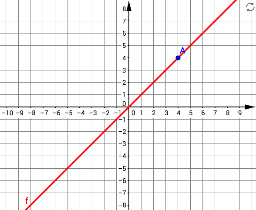
This GeoGebra example demonstrates how to rotate function graphs—including linear, exponential, and power functions—around a fixed point, and observe the resulting geometric relationships with auxiliary triangles and rhombi. The core mathematical concepts involve rotation transformations of function graphs, parameterization of rotation angles, intersection points, symmetry, and how rotation affects the domain and range of a function. Construction highlights: using the Intersect command to find intersection points, Rotate to rotate both graphs and points, Point and Segment to build auxiliary triangles and rhombi, and Angle tools to measure rotation angles α, β, γ. By dynamically adjusting the rotation angle via sliders or input fields, learners can visually explore how a function graph changes its position and orientation while rotating, and how the rotated graph relates to the original graph and auxiliary geometric elements. This resource is suitable for high school and above, for teaching function transformations, geometric transformations, and coordinate geometry, as well as for university-level visual demonstrations of function transformations.
GeoGebra Commands & Parameters
Intersect(xAxis, yAxis) → SRotate(f, α, S) → f_1Rotate(f, β, G) → f_2Point(f) → ARotate(A, α, S) → A'Segment(A, S) → gSegment(S, A') → hAngle(A, S, A') → γRotate(A, β, G) → A''Segment(A, G) → iSegment(G, A'') → jAngle(A, G, A'') → δ
AI Drawing Prompt Reference
Draw coordinate axes and display the graphs of linear, exponential, and power functions. Rotate these graphs around the origin, using auxiliary triangles and rhombuses to show the geometric relationships during rotation. Measure the rotation angles α, β, γ. Adjust the rotation angle dynamically with a slider to observe how the function graphs change position and orientation, and how the rotated graphs relate to the original graphs and auxiliary geometric elements.
The prompt above was compiled from the original drawing commands and is for reference only.